Archive
Disable SSL 3.0 and TLS 1.0 on Forefront TMG and UAG 2010
When performing SSL and TLS hardening on Microsoft Forefront Threat Management Gateway (TMG) 2010 or Forefront Unified Access Gateway (UAG) 2010 servers, disabling SSL 3.0 and TLS 1.0 is often required to meet regulatory and compliance guidelines for security. However, disabling SSL 3.0 and TLS 1.0 causes the SQL Server (ISARS) and SQL Server Express services to fail on start up.

Switching from SQL logging to text file logging can be employed as a workaround. However, when using text file logging, generating historical reports in the TMG management console is no longer supported.
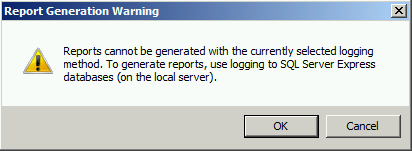
To restore full functionality for SQL logging and reporting when SSL 3.0 and TLS 1.0 are both disabled, an update to the local security policy of the server is required. Open the Local Security Policy editor by clicking on the Start button and navigating to Administrative Tools and Local Security Policy. Expand Local Policies and click on Security Options. Double-click on System cryptography: Use FIPS compliant algorithms for encryption, hashing, and signing. Click Enabled and then click OK.

Restart the computer for the changes to take effect. Once complete, all SQL services should start and run without issue.
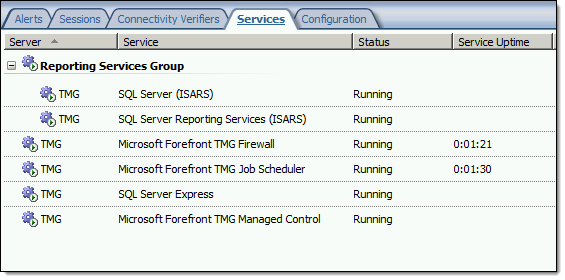
Note: If Remote Desktop Services (RDS) is used to manage the Forefront TMG firewall it will be necessary to install update KB3080079.
Hotfix Rollup 2 for Forefront UAG 2010 Service Pack 4 Now Available
Hotfix Rollup 2 for Microsoft Forefront UAG 2010 Service Pack 4 is now available for download. This hotfix rollup includes fixes for the following issues:
KB3066351 – Client HTTP connections to a UAG redirect trunk receives errors after you install hotfix rollup 1 for Forefront UAG 2010 SP4
KB3070067 – You may receive an HTTP 503 “Service is Unavailable” error when a connection to a UAG trunk fails in Forefront UAG 2010 SP4
KB3068283 – You may receive HTTP 503 errors on a server that is running Forefront UAG 2010 SP4
KB3068289 – Moving mailboxes as part of a hybrid Office 365 migration fails in Forefront UAG 2010 SP4
You can download Hotfix Rollup 2 for Forefront UAG 2010 SP4 here.
Forefront TMG 2010 SQL Services Fail to Start After Disabling SSL 3.0
When performing POODLE attack mitigation on the Forefront TMG 2010 firewall by disabling SSL 3.0, you may encounter a scenario in which TMG’s SQL services fail to start after a reboot.

Looking through the Windows system event log you may see an error message logged by the Service Control Manager with event ID 36871 which states:
A fatal error occurred while creating an SSL server credential.
The internal error state is 10013.

In addition you may also see an error message logged by the Service Control Manager with event ID 7024 which states:
The SQL Server (ISARS) service terminated with service-specific
error %%-2146893007.

This can occur when SSL 3.0 is disabled at the same time that TLS 1.0 is also disabled. Even though TLS 1.1 and 1.2 might be enabled, TMG requires that TLS 1.0 specifically be enabled for SQL server services to function properly when SSL 3.0 is disabled.
To resolve this issue, enable TLS 1.0 Server in the registry by changing the value of Enabled to 1, as shown here. If these registry keys do not exist, create them.

Restart the server for the change to take effect.
Mitigating the POODLE SSL 3 Vulnerability on Forefront TMG 2010
Recently a new and very serious vulnerability in the SSL 3.0 protocol has been discovered that allows an attacker to recover sensitive information for an encrypted session. The Qualys SSL Labs server test has been updated to identify and warn about this issue.
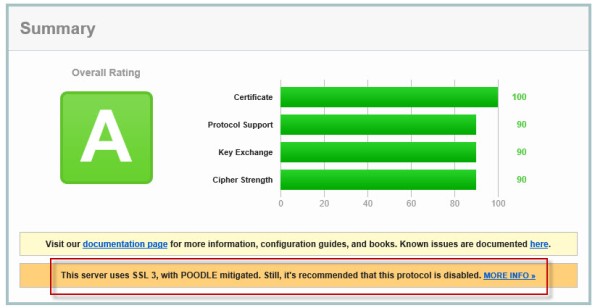
Figure 1 – Qualys SSL Labs Server Test Score for TMG Published Secure Web Site
On a Forefront TMG server with SSL hardening implemented as I’ve outlined here and here, the POODLE attack is mitigated, but it is still recommended that you disable SSL 3.0 altogether. SSL 3.0 is an old, outdated protocol that is no longer widely used, and disabling it should have minimal impact on clients connecting to secure web sites published by the Forefront TMG 2010 firewall.
To disable SSL 3.0 on the TMG firewall, open an elevated PowerShell window and execute the following commands:
New-Item -Path “HKLM:\SYSTEM\CurrentControlSet\Control\SecurityProviders\SCHANNEL\Protocols\SSL 3.0\Server” -Force
New-ItemProperty -Path “HKLM:\SYSTEM\CurrentControlSet\Control\SecurityProviders\SCHANNEL\Protocols\SSL 3.0\Server” -PropertyType dword -Value 0 -Name Enabled
Note: Use caution when copying/pasting the above commands as wrapping of the text has occurred.
A restart of the server is required for the change to take effect.
Recommended Forefront TMG 2010 SSL and TLS Configuration
Last year I wrote an article for ISAserver.org that provided detailed guidance for improving security for SSL and TLS protected web sites using Forefront TMG 2010. Many people have reached out to me recently to ask about enabling forward secrecy, which my original article did not include because, at the time, it was not recommended to enable it. However, as times have changed, it is now recommended to enable forward secrecy so I recently wrote a short post with guidance on how to do that. The post was written with a very narrow scope and addressed only the enabling of forward secrecy for TLS. Many of you have since asked for guidance on overall security best practices with regard to SSL and TLS along with adding support for forward secrecy. In addition to the configuration changes detailed in my original ISAserver.org article, I also recommend the following list of SSL and TLS cipher suites be explicitly enforced using the method outlined here.
TLS_ECDHE_ECDSA_WITH_AES_128_GCM_SHA256_P256
TLS_ECDHE_ECDSA_WITH_AES_128_GCM_SHA256_P384
TLS_ECDHE_ECDSA_WITH_AES_128_GCM_SHA256_P521
TLS_ECDHE_ECDSA_WITH_AES_256_GCM_SHA384_P384
TLS_ECDHE_ECDSA_WITH_AES_256_GCM_SHA384_P521
TLS_ECDHE_ECDSA_WITH_AES_128_CBC_SHA256_P256
TLS_ECDHE_ECDSA_WITH_AES_128_CBC_SHA_P256
TLS_ECDHE_ECDSA_WITH_AES_256_CBC_SHA_P256
TLS_ECDHE_RSA_WITH_AES_128_CBC_SHA256_P256
TLS_ECDHE_RSA_WITH_AES_256_CBC_SHA384_P256
TLS_ECDHE_RSA_WITH_AES_128_CBC_SHA_P256
TLS_ECDHE_RSA_WITH_AES_256_CBC_SHA_P256
TLS_DHE_DSS_WITH_AES_128_CBC_SHA256
TLS_DHE_DSS_WITH_AES_256_CBC_SHA256
TLS_DHE_DSS_WITH_AES_128_CBC_SHA
TLS_DHE_DSS_WITH_AES_256_CBC_SHA
TLS_RSA_WITH_AES_128_CBC_SHA256
TLS_RSA_WITH_AES_256_CBC_SHA256
TLS_RSA_WITH_AES_128_CBC_SHA
TLS_RSA_WITH_AES_256_CBC_SHA
Using this configuration, the Forefront TMG 2010 firewall should receive an A rating from the SSL Labs test site (at the time of this writing).
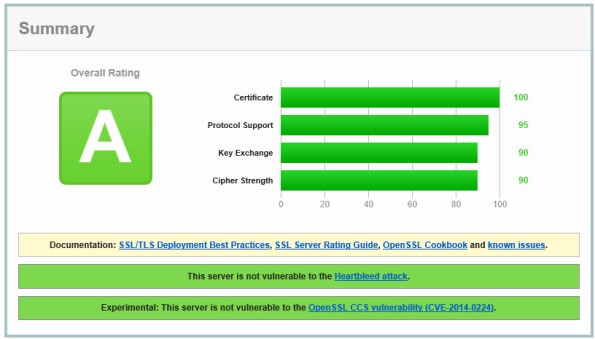
Enabling and supporting the above list of cipher suites will provide the best overall protection and performance for your SSL protected web sites. Note that the list above does not include support for SSL 3.0. If you need to support SSL 3.0 you should add the following cipher suites to the end of the list.
TLS_RSA_WITH_RC4_128_SHA
TLS_RSA_WITH_RC4_128_MD5
Please note that this configuration may not work with older browsers on old, unsupported operating systems, for example Internet Explorer 6 on Windows XP. Before deploying this configuration in production I would encourage you to conduct some testing with your supported clients to ensure operability.
Forefront UAG 2010 End of Life Statement
Today, Microsoft announced the end of life for the Forefront UAG 2010 product. Microsoft will continue to provide mainstream support for UAG until April 14, 2015, and extended support until April 14, 2020. Existing customers with active Software Assurance on their existing UAG licenses as of December 1, 2013, may add new UAG server instances, users, and devices without having to purchase additional UAG licenses. In addition, existing customers who have purchased Forefront UAG server licenses will be given upgrade rights to Windows Server 2012 R2, which provides some of the remote access features found in Forefront UAG. For example, Windows Server 2012 R2 supports DirectAccess, client-based VPN, and reverse web proxy with new Web Application Proxy role.
With regard to license upgrade rights, users are entitled to a Windows Server 2012 R2 license for each Forefront UAG server license (or External Connector license) they currently own. Software Assurance for UAG can still be purchased until January 1, 2014. Forefront UAG 2010 will be removed from the pricelist on July 1, 2014. Forefront UAG 2010 will continue to be available from Microsoft OEM hardware partners like Celestix Networks for the foreseeable future, however.
Forefront UAG Service Pack 4 Now Available for Download
Good news! Service Pack 4 (SP4) for Forefront Unified Access Gateway (UAG) 2010 is now available for download. This latest service pack for UAG includes updates to support Windows 8.1 client devices using Internet Explorer 11, the native mail app, and Remote Desktop Connection (RDC) 8.1 client. In addition, SP4 for Forefront UAG 2010 also includes support for publishing RemoteApps from a Remote Desktop Session Host running on Windows Server 2012 or 2012 R2. The service pack also includes fixes for various reported issues.
KB2907776 – The UserMgrCom service crashes intermittently in Forefront UAG 2010
KB2909151 – Trunk authentication fails when the global catalog server is unavailable in Forefront UAG 2010
KB2909168 – The W3wp.exe process randomly stops and causes all sessions to disconnect in Forefront UAG 2010
KB2909182 – “The URL contains an invalid path” error occurs when you try to access an Exchange 2013 OWA website
KB2909191 – You cannot connect to corporate IPv4 resources by using DirectAccess after Forefront UAG 2010 Service Pack 3 is installed
KB2909350 – An SSL VPN application that has the Socket Forwarding mode set to Disabled uses 100 percent of the CPU’s time in Forefront UAG 2010
KB2909353 – You have to authenticate again to the ADFS server when the published server is configured for single sign-on in Forefront UAG 2010
KB2909356 – A detailed HTTP 403.14 error message occurs when you go to a specific InternalSite URL in a Forefront UAG 2010 environment
KB2909365 – A memory leak in W3wp.exe occurs when Outlook Anywhere is published through a Forefront UAG 2010 trunk
KB2909367 – Intermittent HTTP 500 error codes when you access a Forefront UAG 2010 portal
KB2909376 – File uploads do not occur to SharePoint Server 2013 or SkyDrive Pro through Forefront UAG 2010
KB2910407 – An internal 500 error occurs if a custom URL logoff page is configured in Forefront UAG 2010
KB2910413 – Multiple 4625 event IDs are logged when a user logs on in Forefront UAG 2010
KB2910467 – Configuration activation fails on some servers in a large array in Forefront UAG 2010
KB2910498 – A handle leak occurs in Lsass.exe in Forefront UAG 2010
KB2910506 – An authentication prompt is received even though a user is successfully authenticated in Forefront UAG 2010
KB2910517 – An incorrect domain password policy may be used if Active Directory integrated authentication is configured in Forefront UAG 2010
You must have Forefront UAG 2010 SP3 hotfix rollup 1 installed prior to installing SP4. You can download SP3 rollup 1 here. You can download Forefront UAG 2010 SP4 here. Once the update is installed the new Forefront UAG 2010 build number will be 4.0.4083.10000.
Forefront UAG 2010 Video Training Course Now Available
I’m happy to announce that my latest Trainsignal video training course is now available! This new video training course is on Forefront Unified Access Gateway (UAG) 2010. It is an introductory course on Forefront UAG designed to teach network engineers and security administrators the basic essentials of planning, preparing, installing, configuring, monitoring, and maintain a Forefront UAG 2010 remote access solution. In the course I demonstrate how to publish popular Microsoft on-premises applications like SharePoint and Exchange Outlook Web App (OWA). In addition I cover publishing Remote Desktop Services and VPN remote access. I also provide a high level explanation of endpoint detection and endpoint policy enforcement and demonstrate how to provide high availability for the solution. Here is the entire course outline:
Lesson 1 – Introduction and Course Outline
Lesson 2 – Forefront UAG 2010 Overview
Lesson 3 – Planning to Deploy Forefront UAG 2010
Lesson 4 – Installing and Configuring Forefront UAG 2010
Lesson 5 – Configuring a Portal
Lesson 6 – Publishing Exchange Outlook Web App
Lesson 7 – Publishing SharePoint
Lesson 8 – Publishing Remote Desktop Services
Lesson 9 – Configuring VPN Remote Access
Lesson 10 – Enabling Endpoint Detection
Lesson 11 – Configuring High Availability
Lesson 12 – Web Monitor Overview
Lesson 13 – Forefront UAG Backups
Once again I had the opportunity to work with my good friend and fellow Microsoft MVP Jordan Krause on this course. As he did in my previous Trainsignal video training course on Windows Server 2012 DirectAccess, Jordan served as the technical reviewer and provided valuable insight that ultimately made the course better. If you’re planning to implement Forefront UAG 2010 to provide secure remote access to both managed and non-managed systems and devices, be sure to sign up for a subscription at Trainsignal.com today! Not only will you have access to this video training course on Forefront UAG 2010, you will gain access to the entire Trainsignal library of content, including my course on Windows Server 2012 DirectAccess, all for just $49.00 per month!

Forefront UAG 2010 Service Pack 3 Now Available
Service Pack 3 for Microsoft Forefront UAG 2010 is now available for download. SP3 for Forefront UAG 2010 includes several important new features and enhanced functionality, including:
Support for Internet Explorer 10 on Windows 8 – Full support is provided only for Internet Explorer 10 in desktop mode. The modern UI version of Internet Explorer 10 does not provide support for browser add-ons. If a user accesses the Forefront UAG 2010 portal and the trunk is configured to install and launch the UAG client components, the user will receive a message indicating that the site requires add-ons which will require the desktop version of Internet Explorer 10.
Support for the Native Windows 8 Mail App – Windows 8 users can now connect to published Exchange servers using the built-in Windows 8 modern UI mail app
Remote Desktop Connection (RDC) 8.0 client support – Windows 8 users and Windows 7 users who have upgraded to the RDC client v8.0 can now access remote desktop resources published by Forefront UAG 2010 SP3
Exchange Server 2013 – Application publishing wizards in Forefront UAG 2010 SP3 now include native support for Exchange Server 2013
SharePoint Server 2013 – Application publishing wizards in Forefront UAG 2010 SP3 now include native support for SharePoint Server 2013
Support for Office 2013 applications – Publishing Office 2013 applications such as Outlook, PowerPoint, Word, and Excel is now natively supported in Forefront UAG 2010 SP3
You can download SP3 for Forefront UAG 2010 here.
Hotfix Rollup 3 for Forefront TMG 2010 SP2 Now Available
Hotfix rollup 3 for Microsoft Forefront TMG 2010 with Service Pack 2 is now available for download. This latest hotfix rollup includes fixes for the following issues:
KB2700248 – A server that is running Forefront TMG 2010 may stop accepting all new connections and may become unresponsive
KB2761736 – All servers in a load balanced web farm may become unavailable in Forefront TMG 2010
KB2761895 – The Firewall service (wspsrv.exe) may crash when the firewall policy rules are reevaluated in Forefront TMG 2010
KB2780562 – PPTP connections through Forefront TMG 2010 may be unsuccessful when internal clients try to access a VPN server on the external network
KB2780594 – A non-web-proxy client in a Forefront TMG 2010 environment cannot open certain load-balanced websites when TMG HTTPS inspection is enabled
KB2783332 – You cannot log on when FQDN is used and authentication delegation is set to “Kerberos constrained delegation” in a Forefront TMG 2010 environment
KB2783339 – A closed connection to a domain controller is never reestablished when authentication delegation is set to “Kerberos constrained delegation” in a Forefront TMG 2010 environment
KB2783345 – Unexpected authentication prompts while you use an OWA website that is published by using Forefront TMG 2010 when RSA authentication and FBA are used
KB2785800 – A “DRIVER_IRQL_NOT_LESS_OR_EQUAL stop error may occur on a server that is running Forefront TMG 2010
KB2790765 – A “Host Not Found (11001)” error message occurs when an SSL site is accessed by using a downstream Forefront TMG 2010 server that has HTTPS Inspection enabled
You can download hotfix rollup 3 for Forefront TMG 2010 SP2 here. After applying this update, the new Forefront TMG 2010 build number will be 7.0.9193.575.
Connect


 Richard Hicks' Forefront TMG Blog