Archive
Hotfix Rollup 2 for Forefront UAG 2010 Service Pack 4 Now Available
Hotfix Rollup 2 for Microsoft Forefront UAG 2010 Service Pack 4 is now available for download. This hotfix rollup includes fixes for the following issues:
KB3066351 – Client HTTP connections to a UAG redirect trunk receives errors after you install hotfix rollup 1 for Forefront UAG 2010 SP4
KB3070067 – You may receive an HTTP 503 “Service is Unavailable” error when a connection to a UAG trunk fails in Forefront UAG 2010 SP4
KB3068283 – You may receive HTTP 503 errors on a server that is running Forefront UAG 2010 SP4
KB3068289 – Moving mailboxes as part of a hybrid Office 365 migration fails in Forefront UAG 2010 SP4
You can download Hotfix Rollup 2 for Forefront UAG 2010 SP4 here.
Hotfix Rollup 5 for Forefront TMG 2010 SP2 Now Available
Hotfix rollup 5 for Microsoft Forefront TMG 2010 with Service pack 2 (SP2) is now available for download. This latest hotfix rollup includes fixes for the following issues:
KB2963805 – Account lockout alerts are not logged after you install Rollup 4 for Forefront TMG 2010 SP2
KB2963811 – The Forefront TMG 2010 Firewall service (wspsrv.exe) may crash when the DiffServ filter is enabled
KB2963823 – “1413 Invalid Index” after you enable cookie sharing across array members in Forefront TMG 2010
KB2963834 – HTTPS traffic may not be inspected when a user accesses a site through Forefront TMG 2010
KB2967726 – New connections are not accepted on a specific web proxy or web listener in Forefront TMG 2010
KB2965004 – EnableSharedCookie option doesn’t work if the Forefront TMG 2010 service runs under a specific account
KB2932469 – An incorrect value is used for IPsec Main Mode key lifetime in Threat Management Gateway 2010
KB2966284 – A zero value is always returned when an average counter of the “Forefront TMG Web Proxy” object is queried from the .NET Framework
KB2967763 – The “Const SE_VPS_VALUE = 2” setting does not work for users if the UPN is not associated with a real domain
KB2973749 – HTTP Connectivity Verifiers return unexpected failures in TMG 2010
You can download hotfix rollup 5 for Forefront TMG 2010 SP2 here. After applying this update, the new Forefront TMG 2010 build number will be 7.0.9193.644.
Forefront UAG Service Pack 4 Now Available for Download
Good news! Service Pack 4 (SP4) for Forefront Unified Access Gateway (UAG) 2010 is now available for download. This latest service pack for UAG includes updates to support Windows 8.1 client devices using Internet Explorer 11, the native mail app, and Remote Desktop Connection (RDC) 8.1 client. In addition, SP4 for Forefront UAG 2010 also includes support for publishing RemoteApps from a Remote Desktop Session Host running on Windows Server 2012 or 2012 R2. The service pack also includes fixes for various reported issues.
KB2907776 – The UserMgrCom service crashes intermittently in Forefront UAG 2010
KB2909151 – Trunk authentication fails when the global catalog server is unavailable in Forefront UAG 2010
KB2909168 – The W3wp.exe process randomly stops and causes all sessions to disconnect in Forefront UAG 2010
KB2909182 – “The URL contains an invalid path” error occurs when you try to access an Exchange 2013 OWA website
KB2909191 – You cannot connect to corporate IPv4 resources by using DirectAccess after Forefront UAG 2010 Service Pack 3 is installed
KB2909350 – An SSL VPN application that has the Socket Forwarding mode set to Disabled uses 100 percent of the CPU’s time in Forefront UAG 2010
KB2909353 – You have to authenticate again to the ADFS server when the published server is configured for single sign-on in Forefront UAG 2010
KB2909356 – A detailed HTTP 403.14 error message occurs when you go to a specific InternalSite URL in a Forefront UAG 2010 environment
KB2909365 – A memory leak in W3wp.exe occurs when Outlook Anywhere is published through a Forefront UAG 2010 trunk
KB2909367 – Intermittent HTTP 500 error codes when you access a Forefront UAG 2010 portal
KB2909376 – File uploads do not occur to SharePoint Server 2013 or SkyDrive Pro through Forefront UAG 2010
KB2910407 – An internal 500 error occurs if a custom URL logoff page is configured in Forefront UAG 2010
KB2910413 – Multiple 4625 event IDs are logged when a user logs on in Forefront UAG 2010
KB2910467 – Configuration activation fails on some servers in a large array in Forefront UAG 2010
KB2910498 – A handle leak occurs in Lsass.exe in Forefront UAG 2010
KB2910506 – An authentication prompt is received even though a user is successfully authenticated in Forefront UAG 2010
KB2910517 – An incorrect domain password policy may be used if Active Directory integrated authentication is configured in Forefront UAG 2010
You must have Forefront UAG 2010 SP3 hotfix rollup 1 installed prior to installing SP4. You can download SP3 rollup 1 here. You can download Forefront UAG 2010 SP4 here. Once the update is installed the new Forefront UAG 2010 build number will be 4.0.4083.10000.
Hotfix Rollup 4 for Forefront TMG 2010 SP2 Now Available
Hotfix rollup 4 for Microsoft Forefront TMG 2010 with Service Pack 2 (SP2) is now available for download. This latest hotfix rollup includes fixes for the following issues:
KB2889345 – Accounts are locked out beyond the AccountLockoutResetTime period in Forefront TMG 2010 SP2
KB2890549 – Incorrect Performance Monitor values when queried from a .NET Framework app in Forefront TMG 2010
KB2890563 – “URL” and “Destination Host Name” values are unreadable in the web proxy log of Forefront TMG 2010
KB2891026 – Firewall Service leaks memory if Malware Inspection is enabled in Forefront TMG 2010
KB2888619 – A password change is unsuccessful if a user’s DN attribute contains a forward slash and an Active Directory LDAP-defined special character in Forefront TMG 2010
KB2863383 – “Query stopped because an error occurred while it was running” when you run a non-live query in Forefront TMG 2010 SP2
KB2899720 – Threat Management Gateway 2010 incorrectly sends “Keep-Alive” headers when it replies to Media Player WPAD file requests
KB2899716 – Firewall service (Wspsrv.exe) crashes when a web publishing request is handled in Forefront TMG 2010
KB2899713 – Access to certain SSL websites may be unavailable when HTTPS Inspection is enabled in Forefront Threat Management Gateway 2010
You can download hotfix rollup 4 for Forefront TMG 2010 SP2 here. After applying this update, the new Forefront TMG 2010 build number will be 7.0.9193.601.
Forefront UAG 2010 Service Pack 3 Now Available
Service Pack 3 for Microsoft Forefront UAG 2010 is now available for download. SP3 for Forefront UAG 2010 includes several important new features and enhanced functionality, including:
Support for Internet Explorer 10 on Windows 8 – Full support is provided only for Internet Explorer 10 in desktop mode. The modern UI version of Internet Explorer 10 does not provide support for browser add-ons. If a user accesses the Forefront UAG 2010 portal and the trunk is configured to install and launch the UAG client components, the user will receive a message indicating that the site requires add-ons which will require the desktop version of Internet Explorer 10.
Support for the Native Windows 8 Mail App – Windows 8 users can now connect to published Exchange servers using the built-in Windows 8 modern UI mail app
Remote Desktop Connection (RDC) 8.0 client support – Windows 8 users and Windows 7 users who have upgraded to the RDC client v8.0 can now access remote desktop resources published by Forefront UAG 2010 SP3
Exchange Server 2013 – Application publishing wizards in Forefront UAG 2010 SP3 now include native support for Exchange Server 2013
SharePoint Server 2013 – Application publishing wizards in Forefront UAG 2010 SP3 now include native support for SharePoint Server 2013
Support for Office 2013 applications – Publishing Office 2013 applications such as Outlook, PowerPoint, Word, and Excel is now natively supported in Forefront UAG 2010 SP3
You can download SP3 for Forefront UAG 2010 here.
Forefront TMG 2010 Update Center Quick Tip
The Update Center in the Forefront TMG 2010 management console provides an instant view of the status of signature updates for the Malware Inspection and Network Inspection System (NIS) protection mechanisms. However, the column layout leaves out important information that can be essential when troubleshooting signature update issues. By default, the Last Checked and Last Success columns are hidden from view. To display these details, right-click anywhere in the column headings and then select Add/Remove Columns.
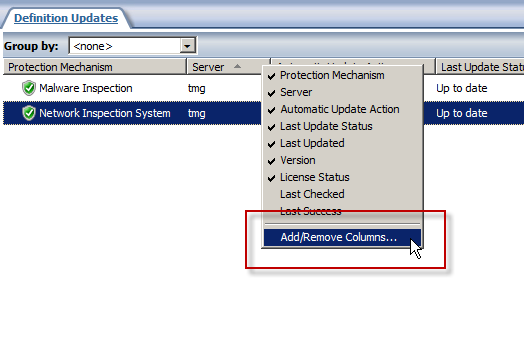
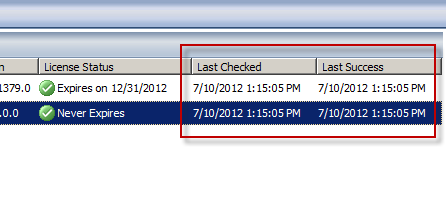
Next, select the Last Checked and Last Success columns and click Add.

Now you’ll see when the Forefront TMG 2010 firewall last checked for updates and when it was last successful.
Hotfix Rollup 1 for Forefront TM 2010 SP2 Now Available
A hotfix rollup for Forefront TMG 2010 SP2 is now available. The hotfix rollup resolves several reported issues with TMG, including:
KB2654016 – A client may be unsuccessful in accessing a Java SSO application published to the web by Forefront TMG 2010
KB2653703 – “Error: Subreport could not be shown” error message in the User Activity or Site Activity report in Forefront TMG 2010
KB2654585 – UDP packets may become backlogged when you increase the “maximum concurrent UDP sessions per IP address” setting in Forefront TMG 2010
KB2624178 – Forefront TMG 2010 administrators may be unable to generate reports
KB2636183 – Both sides of a TCP connection are closed when the client or remote application half-closes the TCP connection in Forefront TMG 2010
KB2653669 – Summary information for the Top Overridden URLs table and for the Top Rule Override Users table display incorrect information in Forefront TMG 2010
KB2617060 – Forefront TMG 2010 enables L2TP site-to-site connections in RRAS
KB2655951 – Japanese characters in the subject line of an Alert email message are not readable in the Japanese version of Forefront TMG 2010
KB2654068 – “The Web Listener is not configured to use SSL” warning message may occur when you configure a Web Listener to use a valid SSL certificate in Forefront TMG 2010
KB2654193 – You receive a “Bad Request” error message when you try to access Outlook Web App published by Forefront TMG 2010
KB2654074 – String comparison may become case-sensitive when you published a website using Forefront TMG 2010
KB2658903 – Forefront TMG 2010 firewall service (wspsrv.exe) may crash frequently for a published website secured by SSL after you install Service Pack 2.
Hotfix rollup 1 for Forefront TMG 2010 SP2 can be downloaded here. After applying this update, the new Forefront TMG 2010 build number will be 7.0.9193.515.
Updating SQL Server on Forefront TMG 2010
Keeping the base operating system of your Forefront TMG 2010 firewall up to date is vitally important to the overall security of your edge security solution. To manage system updates, many administrators will configure their Forefront TMG 2010 firewalls to use Windows Update or WSUS, or manage them using System Center Configuration Manager (SCCM) or another third-party systems management platform.
In my experience, SQL server running on the Forefront TMG 2010 firewall is often overlooked and commonly not updated. I believe this happens because updates for SQL server are classified as optional.
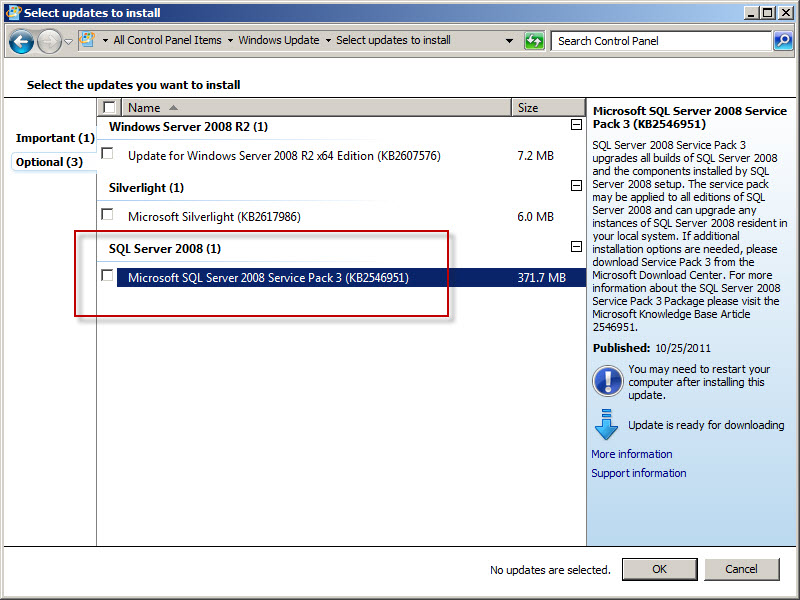
So, as a reminder, don’t overlook updates for SQL server on Forefront TMG 2010 firewalls or UAG 2010 servers! Using the Windows Update control panel application, select the option to install the latest service pack for Microsoft SQL Server 2008, which at the time of this writing is Service Pack 3. You can install the service pack directly if you choose; SQL Server 2008 Express SP3 can be downloaded here. After applying the latest service pack you can confirm that SQL has been updated by opening an elevated command prompt and entering the following commands:
osql -E -S .\msfw

select @@version [press enter]
go [press enter]
The output of the command should indicate that the installed SQL version is Microsoft SQL Server 2008 (SP3) – 10.0.5500.0 (X64).
Note: Applying service packs and updates to SQL is highly recommended to maintain the most secure Forefront TMG 2010 firewall possible. Upgrading the version of SQL installed on the TMG firewall is not supported and definitely not recommended, so don’t attempt to upgrade to SQL Server 2008 R2 Express.
Forefront TMG 2010 Service Pack 2 Now Available
Service Pack 2 for Microsoft Forefront TMG 2010 is now available. In addition to numerous fixes released since SP1 and SP1 hotfix rollup 4, this service pack also includes the following new features:
New reports – A new site activity report that provides details about requests made to specific web sites for individual users.
New error pages – TMG SP2 provides the option to use new error pages that feature a whole new look and feel. In addition, these new error pages are more easily customized and can now include embedded objects.
Kerberos authentication for NLB – TMG SP2 includes the ability to leverage Kerberos authentication for clients accessing enterprise arrays via the NLB virtual IP address (VIP).
You can download Forefront TMG 2010 service pack 2 here. Please note that this update requires that Forefront TMG 2010 SP1 and software update 1 for TMG SP1 be installed prior to installing Forefront TMG 2010 SP2. Once TMG SP2 has been installed successfully the build number will be 7.0.9193.500.
For information regarding the installation of SP2 for Forefront TMG 2010 on enterprise arrays, click here.
Connect


 Richard Hicks' Forefront TMG Blog