Disable SSL 3.0 and TLS 1.0 on Forefront TMG and UAG 2010
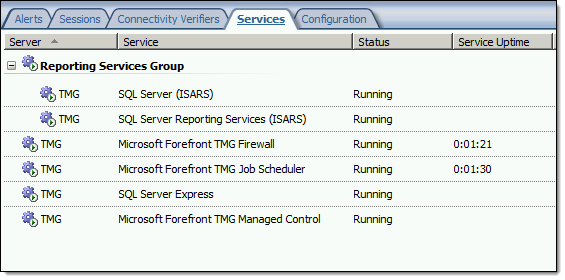
When performing SSL and TLS hardening on Microsoft Forefront Threat Management Gateway (TMG) 2010 or Forefront Unified Access Gateway (UAG) 2010 servers, disabling SSL 3.0 and TLS 1.0 is often required to meet regulatory and compliance guidelines for security. However, disabling SSL 3.0 and TLS 1.0 causes the SQL Server (ISARS) and SQL Server Express services to fail on start up.

Switching from SQL logging to text file logging can be employed as a workaround. However, when using text file logging, generating historical reports in the TMG management console is no longer supported.
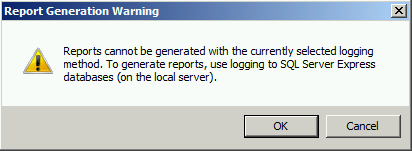
To restore full functionality for SQL logging and reporting when SSL 3.0 and TLS 1.0 are both disabled, an update to the local security policy of the server is required. Open the Local Security Policy editor by clicking on the Start button and navigating to Administrative Tools and Local Security Policy. Expand Local Policies and click on Security Options. Double-click on System cryptography: Use FIPS compliant algorithms for encryption, hashing, and signing. Click Enabled and then click OK.

Restart the computer for the changes to take effect. Once complete, all SQL services should start and run without issue.
Note: If Remote Desktop Services (RDS) is used to manage the Forefront TMG firewall it will be necessary to install update KB3080079.
Troubleshooting with the Windows Sysinternals Tools 2nd Edition Now Available
The Windows Sysinternals utilities are essential tools for troubleshooting Windows platforms and systems. The tools are being updated constantly, and recently a 2nd edition of the book “Troubleshooting with the Windows Sysinternals Tools” was released. This is an important reference for anyone using these tools to perform Windows troubleshooting. Order your copy today!

Implementing DirectAccess with Windows Server 2016 Now Available
I am very excited to announce that my new DirectAccess book, “Implementing DirectAccess with Windows Server 2016“ from Apress media, is now shipping! The book is available on popular online sites like Amazon.com, Barnes & Noble, Springer.com, Apress.com, and others. The book is also available in electronic formats such as Amazon Kindle and Barnes & Noble Nook, as well as a variety of subscription formats including Safari, Books24x7, and SpringerLink.
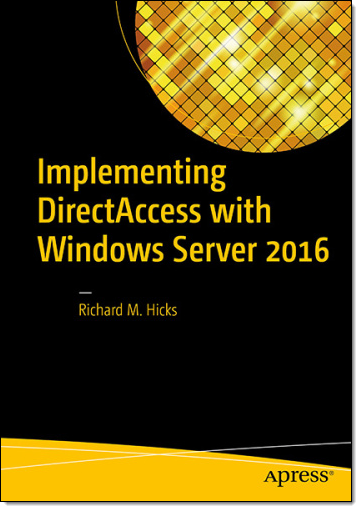
This book contains detailed and prescriptive guidance for the planning, design, implementation, and support of a DirectAccess remote access solution on Windows Server 2016. It also includes valuable insight, tips, tricks, and best practice recommendations gained from my many years of deploying DirectAccess for some of the largest organizations in the world.
Current DirectAccess administrators will also find this book helpful, as the majority of content is still applicable to DirectAccess in Windows Server 2012 and Windows Server 2012 R2. In addition, the book also includes essential information on the design and deployment of highly available and geographically redundant DirectAccess deployments.
Troubleshooting DirectAccess can be a daunting task, so I’ve dedicated an entire chapter in the book to this topic. For those responsible for the maintenance and support of DirectAccess in their organization, this chapter alone will be worth the investment.
Be sure to order your copy today!
Microsoft Reputation Services (MRS) Offline after December 31, 2015
 As I recently mentioned, Microsoft has discontinued and will be terminating their Microsoft Reputation Services (MRS) cloud URL categorization service on or shortly after December 31, 2015. Today, Microsoft released additional information vital to TMG administrators everywhere who are still relying on this service for URL filtering. Specifically, what happens with TMG once Microsoft officially turns off MRS and it is no longer available?
Bad things.
First, any firewall rules that rely on URL categorization to allow traffic will fail closed. That is, they will block all traffic. Second, any rules using URL categorization to deny traffic will fail open and allow that traffic instead. Finally, there is potential performance degradation that may occur with TMG after the service is disabled by Microsoft.
What to do?
First, update any TMG firewall rules that use URL Categories or URL Category Sets. You can replace them with Domain Name Sets or URL Sets, if desired. Next, disable the use of URL filtering in TMG by opening the TMG management console, right-clicking Web Access Policy and choosing Configure and then URL Filtering. Uncheck the box next to Enable URL Filtering and then click Ok.

Finally, consider a replacement solution for TMG’s URL filtering. There are a number of solutions available, both on-premises and cloud-based, that are capable replacements. The Zscaler solution is highly effective, and if you’re looking for a low-buck alternative, consider something like OpenDNS. There are many more, I’m sure.
Good luck!
Using PowerShell to Determine Forefront TMG Build Number
 Identifying the current build number of your Forefront TMG 2010 installation is critically important when making changes or updates to the system. It is generally recommended that all TMG firewalls be on the same release, so having this information is essential. Many TMG administrators use the TMG management console to gather this information, but I can tell you based on experience that this is not always the most accurate method to use.
I much prefer to gather this information programmatically at the command line. In the past I’ve written about using VBScript to do this, but it’s almost 2016 now and we really should be using PowerShell whenever possible. To that end, here are a few lines of PowerShell code you can use to accurately determine which version and build number your TMG firewall is currently running.
$FPC = New-Object -ComObject FPC.Root
$Server = $FPC.GetContainingServer()
$Server.ProductVersion

If you’ve done any work at all with VBScript and the TMG’s FPC COM object, you’ll no doubt be able to convert some of your existing scripts to PowerShell. Also, PowerShell, with its tab auto completion, is much more discoverable than using VBScript with COM, so I’m sure you’ll be able to do a lot more with TMG using PowerShell.
Enjoy!
Reminder: Microsoft Reputation Services (MRS) End of Support
 As a reminder to anyone out there still using the URL filtering feature of their Forefront TMG 2010 firewall, the Microsoft Reputation Services (MRS) service, which provides URL categorization for TMG, will no longer be supported after December 31, 2015. After this date, Microsoft will cease updating their URL categorization database. In addition, there are no guarantees from Microsoft that the service will be available in any form, so customers still using this service are strongly encouraged to look for alternative solutions.
For many organizations, this means migrating to another platform entirely, which is not a bad idea considering that TMG is nearly six years old now. Alternatively, it is possible to replace TMG’s web filtering component. This can be done on premises by using integrations from various third-party vendors, or by using a cloud-based solution such as Zscaler.
Regardless which path you take, you have just over one month to identify and implement another URL filtering solution. Good luck!
Hotfix Rollup 2 for Forefront UAG 2010 Service Pack 4 Now Available
Hotfix Rollup 2 for Microsoft Forefront UAG 2010 Service Pack 4 is now available for download. This hotfix rollup includes fixes for the following issues:
KB3066351 – Client HTTP connections to a UAG redirect trunk receives errors after you install hotfix rollup 1 for Forefront UAG 2010 SP4
KB3070067 – You may receive an HTTP 503 “Service is Unavailable” error when a connection to a UAG trunk fails in Forefront UAG 2010 SP4
KB3068283 – You may receive HTTP 503 errors on a server that is running Forefront UAG 2010 SP4
KB3068289 – Moving mailboxes as part of a hybrid Office 365 migration fails in Forefront UAG 2010 SP4
You can download Hotfix Rollup 2 for Forefront UAG 2010 SP4 here.
ISAinfo Forefront TMG 2010 Configuration Reporting Utility
 With the demise of isatools.org a few years ago, many ISA Server and Forefront TMG 2010 administrators have reached out to me to ask where they can find the ISAinfo tool that was previously found on that site. If you’re not familiar with ISAinfo, it was a great utility used for viewing the ISA or TMG configuration by parsing the configuration export. This tool is tremendously useful for providing support, as it includes all of the information required to provide context for troubleshooting. In addition it is an excellent documentation tool.
So, if you’re looking for a reputable location from which to download this tool, look no further. I’ve placed the isainfo.zip file along with the checksums for file verification on my public OneDrive. Enjoy!
ISAinfo.zip – http://1drv.ms/1Q8GOaA
Checksums – http://1drv.ms/1Q8GWqq
Fastvue TMG Reporter 3.0 with Site Clean Now Available
 Just a few months ago I wrote about the beta release of Fastvue’s TMG Reporter v3.0, which includes some compelling new features that TMG firewall administrators are sure to love. Today I’m happy to announce that TMG Reporter 3.0 is now generally available. If you’re still using Forefront TMG 2010 in production, you’ll certainly want to check out the latest features TMG Reporter v3.0 has to offer. Site Clean is sure to impress! Head over to the Fastvue blog for more information.
http://fastvue.co/tmgreporter/blog/fastvue-tmg-reporter-v3-0-out-now/
Fastvue TMG Reporter 3.0 Beta Now Available
I’m a huge fan of the Fastvue TMG Reporter advanced reporting solution. If you’ve spent any time at all with the native Forefront TMG 2010 reporting tools, you know they are, as my British friends say, “rubbish”. While it is possible to configure Forefront TMG 2010 to log to an external SQL server and create your own reports, a better alternative is to use Fastvue TMG Reporter. They’ve already done all the hard work for you! Also, TMG Reporter from Fastvue works with TMG when configured to use an external SQL server, so you get the best of both worlds!
Recently the fine folks at Fastvue announced a sneak peak at their latest update to TMG Reporter in v3.0 Beta. This latest release includes a bunch of great new features, including the following:
- Site Clean – This provides a way to clean up a lot of noise from your activity reports by consolidating related requests (e.g. analytics and CDN requests).
- Private Report Sharing – Create a report for an individual or group and prevent them from accessing any other report data.
- AD Security Group Filtering – A must have for searching activity reports!
- Export to CSV for Reports and Report Tables – Great feature for detailed, granular data analysis offline.
- Filter by Firewall Server Name or IP Address – This is essential for enterprise customers managing multiple TMG firewalls across the organization.
The latest release also includes Gantt Bars for Activity Reports, changes to the Productivity Dashboard, inclusion of search terms in User Overview reports, an updated Alerts interface, and improved data visibility. In addition, v3.0 includes memory usage improvements and the usual bug fixes and miscellaneous minor improvements.
Be sure to download Fastvue TMG Report v3.0 Beta today!
Connect


 Richard Hicks' Forefront TMG Blog