Wireshark v1.2.3 Now Available!
Wireshark just announced the availability of Wireshark v1.2.3. Included in this release is version 4.1.1 of WinPcap that now works with Windows 7! Download your copy today!

Free e-Book: Introducing Windows Server 2008 R2
Microsoft Press recently announced the availability of a FREE e-Book entitled “Introducing Windows Server 2008 R2”. It is available in XPS and PDF formats. Download your copy today!
ISA 2006 Flood Mitigation Strategies
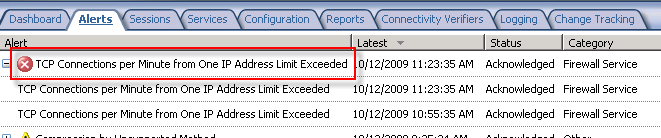
The flood mitigation features included in Microsoft ISA Server 2006 were one of many improvements over previous versions of ISA. Enabled by default, this enhanced network protection functionality allows the ISA firewall to withstand direct attacks (e.g. DoS or SYN flood) and provides resiliency in the event of a worm breakout. There are times, however, when this feature can impede valid network communication. If, for example, a host protected by the ISA firewall is very busy it may run in to connection limits imposed by the firewall. When this happens you may see the following error in the event log: ‘TCP connections per minute from one IP address limit exceeded’.
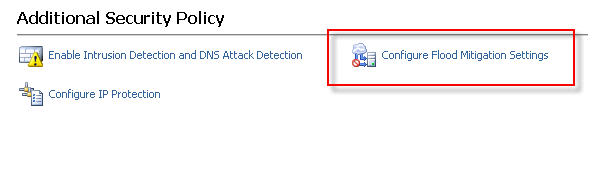
When legitimate network communication is dropped for this reason, it is possible to configure the firewall to allow more connections for this host. This is accomplished by opening the ISA management console, expanding the ‘Configuration’ node in the console tree, then clicking on the ‘Configure Flood Mitigation Settings’ link in the ‘Additional Security Policy’ section.
Too often I see administrators disable flood mitigation altogether. This is strongly discouraged. I also see administrators raise connection limits for ALL hosts by clicking on the ‘Edit…’ button and entering a new limit. This is also a bad practice. The best way to resolve this problem is to add the host(s) to a computer set, then add that computer set to the ‘IP Exceptions’ list.
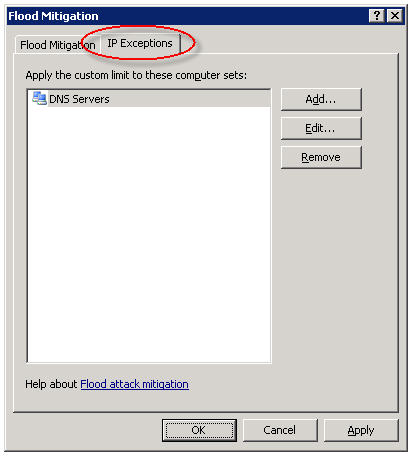
In my experience this often needs to be done for DNS servers and for busy mail servers. Your alerts will tell you which systems are good candidates for the exception list though, so be sure to monitor your ISA firewalls closely.
Forefront Threat Management Gateway 2010 Release Candidate – Available Now!
Good news! Microsoft Forefront Threat Management Gateway 2010 Release Candidate is now available for download! For more information about TMG RC, please read this blog post from the TMG product team.
IIS on ISA – The One Exception!
In a recent blog post, Yuri Diogenes cautions us that we should not be installing IIS on ISA. I couldn’t agree with him more! There is, however, one exception – when it is installed from the factory on a Celestix MSA or WSA Series security appliance. Celestix installs and configures IIS on our ISA and IAG appliances to support our web-based remote management console. Under no circumstances should the IIS services on our appliances be used to support any other content or application. This configuration is definitely not supported and our support engineers will not be able to assist you if you attempt to do so!
Microsoft Most Valuable Professional (MVP) 2009!
I am very excited to announce that I have been awarded the Microsoft Most Valuable Professional (MVP) award for 2009! This is a tremendous honor to be associated with so many wonderful and talented Forefront professionals. There are approximately thirty Forefront MVP’s worldwide, but as it stands today I will be one of only two here in the U.S. (Dr. Shinder has been flying solo for a long time on this one…now he has some company!).

Thanks to all of you who were instrumental in my receiving this award (you know who you are) and a very special thanks to Celestix Networks for giving me the opportunity to be involved with selling the best Windows-based managed security appliances available today.
Windows Sysinternals Administrator’s Reference – Coming Soon!
If you perform any sort of Windows troubleshooting at all, no doubt you have used some of Mark Russinovich’s wonderful Sysinternals Utilities Suite. If not, you are seriously missing out on some valuable diagnostic tools! I use Process Explorer and Process Monitor on an almost daily basis, as I am sure many of you do as well. Other than attending one of Mark’s or David Solomon’s TechEd presentations, training for these tools has been limited. The good news is that soon Microsoft will be releasing the Windows Systernals Administrator’s Reference. This book will be a definite must have for anyone serious about performing diagnostics on the Windows platform. It is available now for pre-order on Amazon.com, so be sure and order your copy today. I did!
ISA 2006 with Integrated Websense and the /3GB Switch
The /3GB boot.ini switch is perhaps the most misunderstood Windows tuning parameter there is. If you are not familiar with this switch, enabling it allows user mode processes to address 3GB of virtual memory instead of the usual 2GB. It does this at the expense of valuable kernel memory, however. The ISA firewall relies heavily on kernel memory (fweng.sys is the heart of the firewall core and runs in kernel mode) and cutting it in half can dramatically affect stability and performance by reducing the amount of available Paged and Non-paged Pool memory and reducing the maximum number of System Page Table Entries (PTEs). It has been well documented that the use of the /3GB boot.ini switch can cause serious issues, and in fact the ISA Best Practices Analyzer complains when it finds this switch in use.

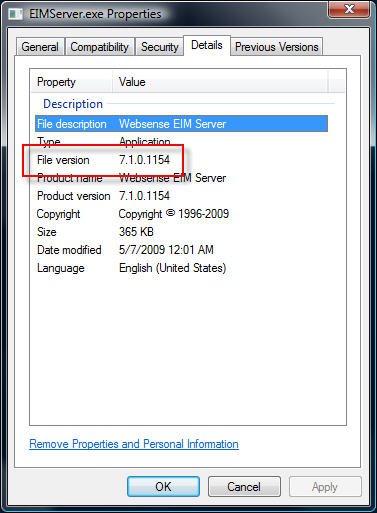
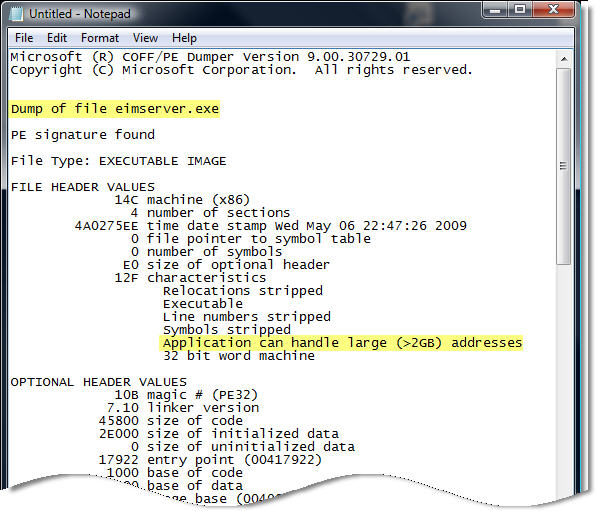
Applications must be configured to take advantage of this additional memory made available by the /3GB switch. You can verify which applications are configured in this manner by using the dumpbin.exe utility that is included with Microsoft Visual C++ and specifying the /HEADERS parameter. Websense has enabled this functionality for some of their core services, and by looking at the headers for eimserver.exe version 7.1.0.1154 we can see that this image does indeed support large address space.
Websense is now optionally recommending that the /3GB switch be enabled when applying certain hotfixes. If you have Websense components installed on the ISA firewall itself I would strongly dissuade you from enabling the /3GB switch. If you are experiencing memory related issues with Websense services on your ISA firewall, add additional RAM. If memory related issues persist, remove all Websense services other than the filtering plug-in and place them on a separate system outside of the ISA firewall. You can then safely enable the /3GB switch on that system.
Configuring Roles and Features in Windows Server 2008 R2
Windows Server 2008 includes a command-line utility called servermanagercmd.exe that allows administrators to configure roles, role services, and features from the command line. Beginning with Windows Server 2008 R2, however, servermanagercmd.exe has been deprecated. When you attempt to run servermanagercmd.exe you will receive the following message:
Servermanagercmd.exe is deprecated, and is not guaranteed to be supported in future releases of Windows. We recommend that you use the Windows PowerShell cmdlets that are available for Server Manager.
Servermanagercmd.exe has been replaced with new PowerShell Server Manager cmdlets (pronounced ‘command-lets’). Before we can use these new cmdlets we must first import them. Open an elevated PowerShell command prompt and enter the following command:
import-module servermanager
Here are the three new PowerShell cmdlets and their corresponding servermanagercmd.exe equivalents [in brackets]:
Add-WindowsFeature [servermanagercmd.exe –install]
Get-WindowsFeature [servermanagercmd.exe –query]
Remove-WindowsFeature [servermanagercmd.exe –remove]
For more information regarding the new PowerShell cmdlets and servermanagercmd.exe, please refer to the Overview of Server Manager Commands article on Microsoft Technet.
Microsoft Exchange Server Remote Connectivity Analyzer
My good friend Andy Tang, who works for e92Plus over in the UK, blogged recently about some issues he was having with ActiveSync on IAG. In his post he talks about using a wonderful utility called the Microsoft Exchange Server Remote Connectivity Analyzer. This online tool will allow you to remotely test ActiveSync, Outlook Anywhere (RPC/HTTP), and inbound SMTP. Excellent!
Connect


 Richard Hicks' Forefront TMG Blog