RSA Conference 2009
If you are planning to attend the 2009 RSA Conference next week (April 21-23, 2009), be sure to stop by the Celestix booth and introduce yourself! We’ll be in booth #248 this year. If you are interested in attending the expo, send me an e-mail and I will provide you with a free expo pass! Hope to see all of you there!
Using the ISA HTTP Filter To Modify Via Headers And Prevent Information Disclosure
The ISA firewall’s powerful HTTP filter allows us to inspect and modify HTTP request and response headers at a very granular level. The HTTP filter by default will allow only valid, RFC compliant HTTP communication to pass through it, and it will also limit the length of request headers. The HTTP filter is highly configurable though, allowing us to control which types of HTTP methods are allowed, which file extensions are allowed, which request or response headers are allowed, as well as giving us the ability to block content containing specific signatures defined by the ISA firewall administrator. Most often these advanced inspection features are used to block specific content using HTTP, such as instant messaging or peer-to-peer applications, or to prevent certain types of attacks against our systems by searching for and blocking communication based on a given string contained in request and response headers and bodies
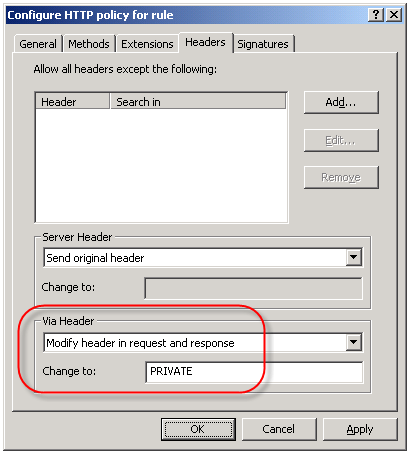
An often overlooked use of the HTTP filter is the ability to control the HTTP Via header. The HTTP Via header is required when a proxy intermediates requests between a user and a remote host (http://www.w3.org/Protocols/rfc2616/rfc2616-sec14.html – section 14.45). By default, the HTTP filter sends the default header, which is the hostname of the ISA firewall that handled the request. Since the hostname of your ISA firewall could (and should) be considered sensitive information, it is a good idea to configure the HTTP filter to send something other than the default header. This is accomplished by right-clicking on each access rule that includes HTTP as a defined protocol and choosing ‘Configure HTTP’. Select the ‘Headers’ tab, then select the option to ‘Modify header in request and response’. In the ‘Change to:’ field, enter something ambiguous. Typically I enter ‘PRIVATE’. If you have multiple ISA firewalls handling outbound Internet communication you may wish to choose something that is ambiguous but still allows you to identify which firewall processed the request, such as FW1.
Controlling ISA Enterprise Configuration Storage Server Replication
One thing I believe that most ISA firewall administrators take for granted is the Configuration Storage server (CSS). Rightfully so however, because with very few exceptions you simply install the CSS (preferably two for redundancy!) and forget about them.
Something that can easily be overlooked with large, complex enterprise deployments with multiple Configuration Storage servers (deployed in multiple geographic locations) is replication. If you are not familiar with the ISA CSS, it is an instance of Microsoft’s Active Directory Application Mode (ADAM); essentially a small, self-contained LDAP directory that is used as the data repository for configuration and policies for Microsoft’s ISA Server 2004 and 2006 Enterprise editions. And exactly like Active Directory Domain Services (AD DS), it is a multi-master database which replicates in much the same way.
When you install the first CSS, a default site is created named ‘Default-First-Site-Name’. When you add additional Configuration Storage servers to this enterprise, regardless of physical location, they are all included in this same default site. In most cases this is not an issue. Having all Configuration Storage servers in a single site ensures that configuration changes between the array members and the CSS are quickly propagated. The assumption of course is that all of these Configuration Storage servers are well connected. If they are not – for instance if you have Configuration Storage servers in your enterprise that are located on the other side of a slow WAN link – this replication can consume a lot of bandwidth and may not be desirable.
In cases such as these it becomes necessary to create ADAM sites, which are identical to AD DS sites. These sites are logical boundaries that typically correspond to physical network locations and can be used to define replication parameters. Intrasite replication assumes that systems are well connected, and as such are optimized for speed. Intersite replication assumes that systems are not well connected, and are therefore optimized for reduced bandwidth consumption.
Configuring ADAM sites is accomplished with the use of the ADAMSites tool. With the ADAMSites tool you can create, view, and delete ADAM sites. Once you have created your ADAM sites you can use the tool to also create, view, and delete site links as well. When creating the site links you can specify the cost of the site link, as well as the replication interval. Once you have established the necessary site links you can then move Configuration Storage servers in to the sites as necessary.
For more information I recommend that you read my good friend Jason Jones’ blog post entitled “Using the ADAM Sites Tool with ISA Server 2006 Enterprise Edition“. Jason also has a very detailed and informative CSS FAQ that is definitely recommended reading for anyone wanting to know more about the Configuration Storage server.
ISA Server Detected Routes…
Another common ISA alert that I often get questions about is the following:
“ISA Server detected routes through the network adapter [network interface] that do not correlate with the network to which this network adapter belongs. When networks are configured correctly, the IP address ranges included in each array-level network must include all IP addresses that are routable through its network adapters according to their routing tables. Otherwise valid packets may be dropped as spoofed. The following ranges are included in the network’s IP address ranges but are not routable through any of the network’s adapters: [address ranges];. Note that this event may be generated once after you add a route, create a remote site network, or configure Network Load Balancing and may be safely ignored if it does not re-occur.
The routing table for the network adapter [network interface] includes IP address ranges that are not defined in the array-level network [network object], to which it is bound. As a result, packets arriving at this network adapter from the IP address ranges listed below or sent to these IP address ranges via this network adapter will be dropped as spoofed. To resolve this issue, add the missing IP address ranges to the array network. The following IP address ranges will be dropped as spoofed: [network object][address ranges];”
Essentially what this alert means is that there is a there is a mismatch between the configuration of the network object in the ISA management console and the routing table of the corresponding network interface. If you are not experiencing any network connectivity issues, or you just made changes to your network configuration, you can probably safely disregard this message. You will not, in most cases, see this message again. If you are seeing this alert on a consistent basis however, you might wish to look at your networking configuration more closely. For the networking to work correctly on the ISA firewall, each network interface should contain routes that correspond to any networks that are reachable through that particular network interface. The network objects in the ISA management console should be configured to include this network and all reachable networks as well. This is critical because if the routing table is configured to include networks that are not included in the ISA network object, the ISA firewall will reject this traffic as spoofed.
There are times when you will have network objects configured with addresses or networks that do not have routes associated with them, and in which case you will see this alert. A case in point would be when a situation arises that you need to exclude a particular address , address range, or subnet that your underlying routing infrastructure routes through another gateway. A common scenario that I have encountered is when registered IP addresses are used for private connectivity over dedicated circuits when connecting to business partners. In this case I would include the IP address(es) of the business partner in the ‘Internal’ network object so that my web proxy and firewall clients would bypass the ISA firewall when communicating with hosts on these networks.
The Perils of Virtualization
With all of the talk recently regarding the availability of Microsoft’s Intelligent Application Gateway (IAG) SP2 and its official support for running in a virtual infrastructure, as well as the support for Microsoft’s Forefront Threat Management Gateway running in virtual environments, there has been a quiet debate running among my colleagues and peers regarding the virtualization of security systems.
I realize that by virtue of the fact that I work for a hardware vendor (Celestix Networks) that my opinions will be considered by many to be biased. Somewhat perhaps, but the fact remains that virtualization, especially the virtualization of a security system, can prove to be extremely risky. Without proper planning, deployment, and ongoing monitoring of the virtual infrastructure the likelihood of a configuration error leading to a total and complete compromise of your security model is extremely high.
For those of you who might think this is just an alarmist’s point of view, I would encourage you to read this story posted recently at InformationWeek.Com. The article talks about a new virtualization security product, but the interesting thing to note here is that it includes a reference to a documented case where the misconfiguration of a virtual network resulted in a sensitive internal database server being connected directly to the public Internet. According to the article, this was put in to operation and was running for some period of time, until someone later discovered the error. Can you imagine if in this case it wasn’t a database server, but a security system responsible for protecting your entire internal private network?
This of course illustrates clearly the point I am trying to make – that there are substantial security risks associated with virtualizing your security infrastructure. Yes, there are some benefits, but I firmly believe that the risks far outweigh the rewards.
Microsoft ISA Server 2006 Now Common Criteria Certified
This morning it was announced that Microsoft ISA Server 2006 Standard and Enterprise editions have completed Common Criteria evaluation. Common Criteria Evaluation Assurance Level 4+ (EAL4+) is the highest level possible that is mutually recognized by all countries participating in certification. This new level of certification validates what those of us in the ISA community have know for quite some time – that the ISA firewall is truly an enterprise class firewall on par with any firewall product available.
ISA Server 2006 Workgroup Deployment Certificate Renewal
One question that I hear with regularity is “how do I renew the machine certificate for my CSS?” when ISA Enterprise is configured in a workgroup. In the past I have recommended running a repair from the installation media, then specifying the new certificate when prompted by the installation wizard. Recently I asked my good friend Yuri Diogenes if there was a better or easier way to accomplish this. In an article he just published on the ‘Tales From The Edge’ community site, he recommended using the ISACertTool utility.
The ISACertTool can be downloaded from Microsoft here. Before running the ISACertTool, make sure that you have a valid server certificate available in an exported (.pfx) file. Also, be sure to place the root certificate of the issuing CA is in a location that is accessible to all array members before running the tool. Once you have downloaded and extracted the ISACertTool according to the documentation, open a command window and execute the following command:
isacerttool.exe /st filename /pswd password /keepcerts
/st filename installs the exported certificate on the CSS. filename specifies the path and name of the exported certificate file.
/pswd password specifies the password that may be required when installing the server certificate
/keepcerts specifies that existing certificates should not be deleted.
Extract the ISACertTool on each array member, then open a command prompt and execute the following command:
isacerttool.exe /fw filename
/fw filename installs the root CA certificate in the local computer store. filename is the path and name of the root CA certificate.
ISA SecureNAT and Firewall Clients Can Bypass Websense Content Filtering
Websense content filtering software is an excellent add-on product for the Microsoft ISA firewall. If you have deployed the ISA firewall to secure outbound Internet access for your organization, I would strongly encourage you to consider this powerful software suite. An ISA/Websense solution will provide unparalleled protection against spyware, malicious mobile code, and many other threats. Websense features granular, user and group based filtering policies and with its modular design is highly scalable. With Websense Web Security you also get features such as enhanced security categories as well as real-time security updates, ensuring that your users are protected at all times, even from today’s advanced blended threats.
Although under most circumstances the Websense content filtering does a fantastic job, it is possible to bypass Websense filtering policies if the software is not configured correctly. For instance, if a workstation is configured as a web proxy client to the ISA firewall, communication is filtered properly. If the workstation also has the Firewall Client installed, the user can simply disable any proxy settings in their web browser, resulting in their HTTP communication being sent to the ISA firewall by the Firewall Client. Due to some vagaries with the inner workings of the Websense filtering mechanism, this communication may not be filtered.
The good news is that this issue is simple to resolve. A little known, and perhaps often overlooked, configuration change needs to be made if you expect content filtering to work correctly for ISA SecureNAT and Firewall Clients. That change is documented in the Websense Installation Guide Supplement for Microsoft ISA Server. On page 13 under the ‘Configuring the ISAPI Filter’ section you will see that in order to correctly filter SecureNAT and Firewall Clients you must create a file called ‘ignore.txt’ in the Windows\System32 folder. This file should contain the hostname of the ISA firewall that the filtering plug-in is installed on (note also that this entry should be in all caps). Recycle the Websense services in order for this change to take effect.
Scalable Networking Pack and the ISA Firewall
If you’ve spent any time at all looking at alerts on a Microsoft ISA firewall, you have no doubt seen the following alert:
“The Windows Server 2003 Scalable Network Pack, which is included in Windows Server 2003 Service Pack 2, is enabled. Some ISA Server features will not work properly if a network adapter installed on an ISA Server computer supports and uses the Scalable Network Pack features. For more information, see the Microsoft Knowledge Base article 948496. If you do not have a network adapter that supports the Scalable Network Pack features, you can disable the Windows Server 2003 Scalable Network Pack Enabled alert.”
What does this mean? What is the Scalable Network Pack? Why are we being alerted about it? How did it get installed? Well, let me answer some of those questions for you!
The Microsoft Windows Server 2003 Scalable Networking Pack (SNP) provides support for network acceleration and offloading technologies available in today’s advanced network interface adapters to increase performance and scalability. It was made available as an update to Microsoft Windows Server 2003 SP1, and was later included in Windows Server 2003 SP2. The Scalable Networking Pack consists of the following three new features:
TCP Chimney Offload – Provides for automated, stateful offload of TCP processing to a network adapter that includes a TCP offload engine (TOE). For certain types of network communication (typically large file transfers) TCP Chimney Offload reduces CPU overhead by offloading network packet processing tasks such as packet segmentation and reassembly to the network adapter.
Receiver-side Scaling – Enables the processing of inbound networking traffic to be shared across multiple CPUs. Applications that rely heavy on inbound network communication that run on a multiprocessor system can benefit from Receiver-side Scaling.
NetDMA – Enables memory management efficiencies through direct memory access (DMA), provided the server supports this.
All of these features are wonderful, and have the ability to dramatically increase throughput and substantially reduce processor utilization for network intensive applications. At first you might think that these features would be beneficial to the ISA firewall, but unfortunately, they are not. TCP offloading is designed primarily for large file transfers, and provides little benefit for short-lived conversations that are typical of network traffic handled by the ISA firewall. There are also some incompatibilities as well. For instance, Receiver-side Scaling is incompatible with both NAT and NLB, both commonly configured on an ISA firewall.
It is for these reasons that you will see this alert generated by the ISA firewall, and as a best practice you should disable these features to prevent unexpected behavior. Microsoft Knowledge Base article 948496 includes an update to turn off the default SNP features, as well as instructions on how to disable these features by editing the registry.
The History of Microsoft
I learned recently from my good friend Kurt Shintaku that Tina from MSDN Channel9 is publishing a video series of the history of Microsoft. Although this is not directly related to Microsoft ISA Server or Forefront Threat Management Gateway, I did think this was interesting and wanted to pass it along to everyone. Each Thursday they will be airing a brand new episode, which will being with the year 1975 when Microsoft was formed.
Connect


 Richard Hicks' Forefront TMG Blog