Bug in Forefront TMG 2010 Service Pack 2
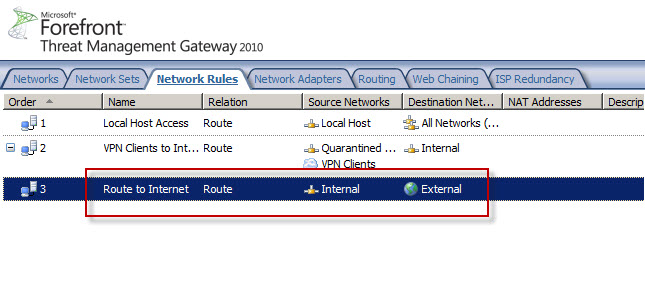
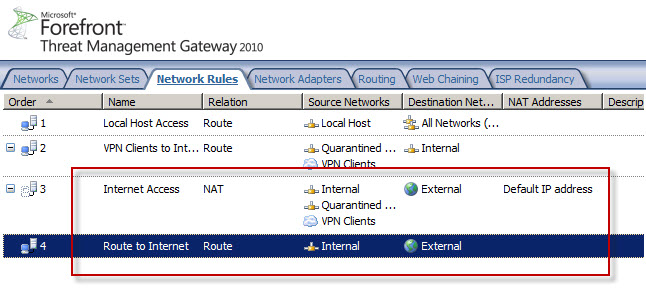
Today I confirmed a bug in Service Pack 2 (SP2) for Forefront TMG 2010 that was discovered by Jason Jones. If you have deleted the default Internet Access network rule and replaced it with something else, installing SP2 for Forefront TMG 2010 mysteriously restores this rule. Unfortunately it places the default Internet Access rule ahead of your custom rule which in most cases will cause serious problems. This bug only affects Forefront TMG 2010 configurations where the default Internet Access network rule has been specifically deleted. If you’ve altered this rule in any way, those changes are unaffected.
Before Forefront TMG SP2 installation…
After Forefront TMG SP2 installation…
Microsoft Security Bulletin MS11-083 and Forefront TMG 2010
Included in the November Microsoft security bulletin release was security update MS11-083 (KB2588516) that addresses a critical vulnerability in TCP/IP that could allow remote code execution. Forefront TMG 2010 firewalls are protected from this vulnerability, as the firewall engine’s kernel mode driver processes packets even before the operating system sees them. More information about how the Forefront TMG 2010 firewall engine and service work can be found here [this document is for ISA, but TMG is similar]. Although the underlying operating system’s TCP/IP networking stack is protected by the Forefront TMG firewall engine driver, TMG administrators are still strongly encouraged to install the MS11-083 update as soon as possible.
Error 0x8004FE2F Activating Windows on Forefront TMG 2010 Protected Network
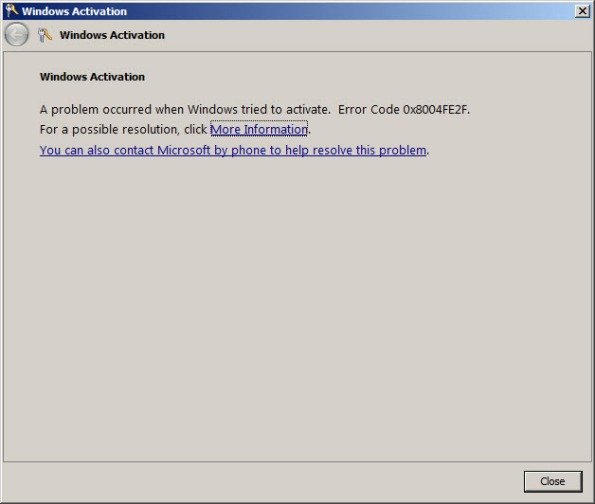
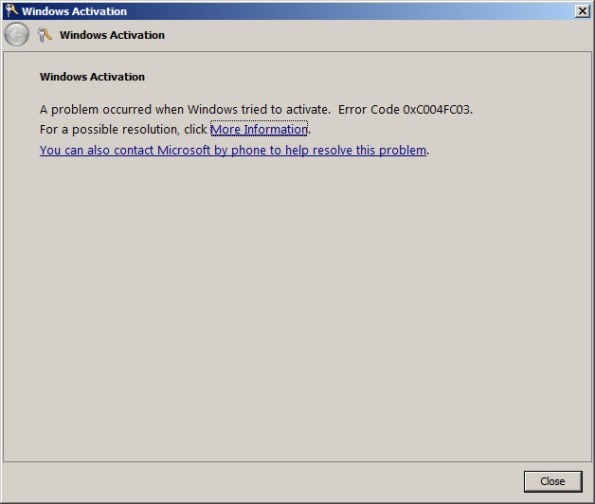
When attempting to activate Windows Server 2008R2 you may receive one of the following error messages:
A problem occurred when Windows tried to activate. Error Code 0x8004FE2F
Or…
A problem occurred when Windows tried to activate. Error Code 0xC004FC03
If you attempt to activate Windows from the command line using slmgr.vbs -ato you may also encounter one of the following error messages:
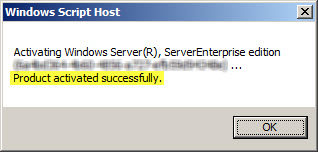
Activating Window Server(R), ServerEnterprise edition {GUID}...
On a computer running Microsoft Windows non-core edition, run 'slui.exe
0x2a 0x8004FE2F' to display the error text.
Error: 0x8004FE2F
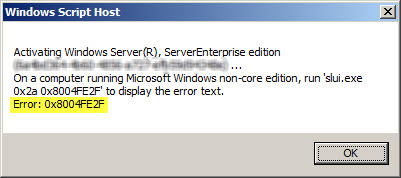
Or…
Activating Window Server(R), ServerEnterprise edition {GUID}...
On a computer running Microsoft Windows non-core edition, run 'slui.exe
0x2a 0x80072EE2' to display the error text.
Error: 0x80072EE2
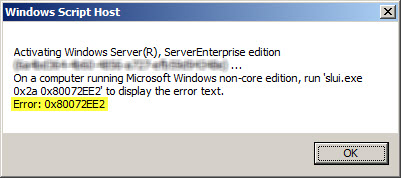
The problem may occur for systems that are located on a network that is protected by a Forefront TMG 2010 firewall, and the access rule that allows the traffic requires authentication. The Windows activation process relies on WinHTTP and by default, WinHTTP communication is sent as SecureNAT client traffic. SecureNAT clients unfortunately cannot be authenticated, so the request fails.
There are two ways resolve this issue. The first is to configure WinHTTP on the Windows system you are trying to activate to use a proxy serverexplicitly. Open an elevated command prompt and enter the following command:
netsh winhttp set proxy <name or IP address of proxy server>:<port>
For example:
netsh winhttp set proxy tmg.richardhicks.net:8080
Instead of making this change to each system you want to activate, an alternative is to create an anonymous access rule on the Forefront TMG 2010 firewall that allows HTTP and HTTPS traffic to those destinations required to activate Windows. Using the Forefront TMG 2010 management console, create an access rule that allows HTTP and HTTPS from the Internal network to a Domain Name Set that contains the following destinations for all users:
activation.sls.microsoft.com.nsatc.net
go.microsoft.com
*.sls.microsoft.com
Make sure this rule is placed before any other rules for HTTP or HTTPS that require authentication.
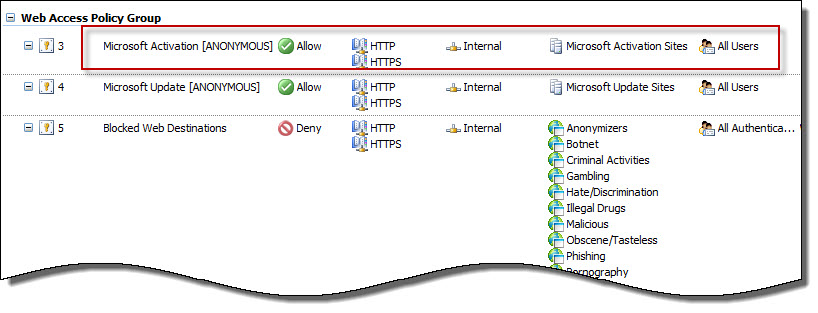
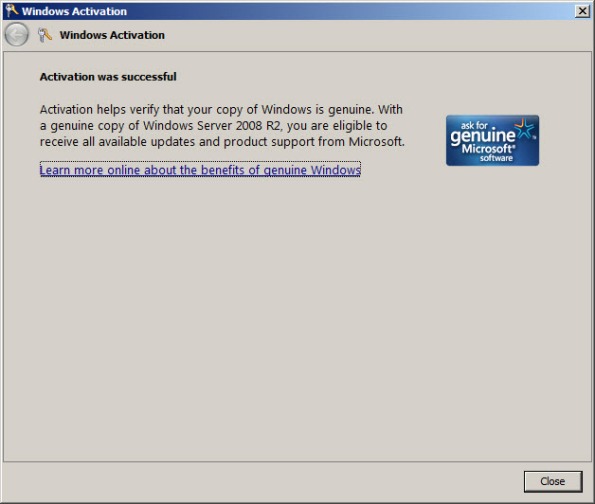
Once configured, activating Windows should work without issue.
Configuring Forefront TMG 2010 HTTPS Inspection Inclusion List
When HTTPS inspection is configured and enabled on a Forefront TMG 2010 firewall, the administrator has the option to define web sites to exclude from HTTPS inspection. This may be required for a variety of reasons. For example, an administrator may need to exclude certain destinations to address privacy concerns, or perhaps HTTPS inspection breaks an application that uses SSL to tunnel non-HTTP protocols. All HTTPS web sites are inspected except for those sites defined as Destination Exceptions.

Beginning with Service Pack 2 (SP2) for Forefront TMG 2010, administrators can now define an explicit inclusion list for HTTPS inspection. Sites included on this list will be subject to HTTPS inspection, while all other destinations will be excluded. To define an HTTPS inspection inclusion list, create a Domain Name Set and populate it with those destinations for which you explicitly want to enforce HTTPS inspection.

After saving and applying the configuration, copy this VBScript file to the TMG firewall, then open an elevated command prompt and type the following command:
cscript.exe ConfigureHTTPSiInclusionList.vbs <DomainNameSetName>
Substitute <DomainNameSetName> in the command above with the name of the Domain Name Set created earlier. Once configured, the Destination Exceptions tab of the HTTPS Outbound Inspection properties will be greyed out, and only those sites included in the Domain Name Set defined as the HTTPS inspection inclusion list will be subject to HTTPS inspection. All other destinations will be excluded. You can still define Source Exceptions as needed, however.

Only one Domain Name Set can be specified as the HTTPS inspection inclusion list. Running the command without parameters removes any configured inclusion list and returns HTTPS inspection back to its original state.
For more information regarding HTTPS inspection inclusion lists, refer to KB2619986.
Slipstream Service Pack 2 for Forefront TMG 2010
Now that Service Pack 2 (SP2) for Microsoft Forefront TMG 2010 is available I’ve had numerous people ask me about the process of slipstreaming the service pack with the Forefront TMG 2010 installation media. Having Forefront TMG 2010 with SP2 slipstreamed is a great time saver if you install TMG frequently like I do, but it is also essential if you wish to install Forefront TMG 2010 on a read-only domain controller (RODC). Last year when service pack 1 for Forefront TMG 2010 was released I wrote this post on how to slipstream the service pack. The process is nearly identical with Forefront TMG 2010 SP2 with the exception that there are a few more steps required because of TMG SP2’s dependencies on SP1 and software update 1 for TMG SP1.
To slipstream SP2 with the Forefront TMG 2010 installation media, begin by copying the contents of your Forefront TMG 2010 DVD or extracting the ISO to a temporary folder. Next, download Forefront TMG 2010 SP1, Forefront TMG 2010 SP1 software update 1, and Forefront TMG 2010 SP2. Software update 1 for Forefront TMG 2010 SP1 and SP2 for Forefront TMG 2010 are both .exe files that can’t be used for slipstreaming. To support slipstreaming we’ll need to extract the .msp files from them by opening an elevated command prompt and issuing the following commands:
For software update 1 for Forefront TMG 2010 SP1
TMG-KB2288910-amd64-ENU.exe /t d:\temp\SP1U1
For Forefront TMG 2010 SP2
TMG-KB2555840-amd64-ENU.exe /t d:\temp\SP2
Now begin the slipstreaming process by navigating to the \FPC folder of the TMG installation source and then issuing the following commands:
First, slipstream SP1 for Forefront TMG 2010
msiexec /a MS_FPC_Server.msi /p d:\temp\sp1\TMG-KB981324-AMD64-ENU.msp
Next, slipstream software update 1 for Forefront TMG 2010 SP1
msiexec /a MS_FPC_Server.msi /p d:\temp\sp1u1\TMG-KB2288910-amd64-ENU.msp
Finally, slipstream Forefront TMG 2010 SP2
msiexec /a MS_FPC_Server.msi /p d:\temp\sp2\TMG-KB2555840-amd64-ENU.msp
Once complete, use your favorite tool to burn a DVD or create an ISO file.
Important Note: If you install the Forefront TMG 2010 firewall client from the new SP2 slipstreamed installation source, you will still need to install the October 2011 Forefront TMG 2010 firewall client hotfix rollup as outlined in my previous blog post.
Forefront TMG 2010 Service Pack 2 Now Available
Service Pack 2 for Microsoft Forefront TMG 2010 is now available. In addition to numerous fixes released since SP1 and SP1 hotfix rollup 4, this service pack also includes the following new features:
New reports – A new site activity report that provides details about requests made to specific web sites for individual users.
New error pages – TMG SP2 provides the option to use new error pages that feature a whole new look and feel. In addition, these new error pages are more easily customized and can now include embedded objects.
Kerberos authentication for NLB – TMG SP2 includes the ability to leverage Kerberos authentication for clients accessing enterprise arrays via the NLB virtual IP address (VIP).
You can download Forefront TMG 2010 service pack 2 here. Please note that this update requires that Forefront TMG 2010 SP1 and software update 1 for TMG SP1 be installed prior to installing Forefront TMG 2010 SP2. Once TMG SP2 has been installed successfully the build number will be 7.0.9193.500.
For information regarding the installation of SP2 for Forefront TMG 2010 on enterprise arrays, click here.
ISA Server 2006 Hotfix Rollup – September 2011
A hotfix rollup for Microsoft ISA Server 2006 is now available. The hotfix rollup resolves several reported issues with ISA Server, including:
KB2618727 – Users in remote forests cannot change their passwords through ISA Server 2006.
KB2620088 – Large files become corrupted during file transfer through the Socks v4 client.
KB2620076 – Outlook Web App clients are not timed out after the ISA FBA idle time-out is reached.
KB2620069 – ISA 2006 may crash with the error “DRIVER_IRQL_NOT_LESS_OR_EQUAL (d1)”.
KB2622172 – ISA 2006 blocks published website requests for URLs that include carriage returns (CR) or linefeeds (LF).
The latest ISA server 2006 hotfix rollup can be downloaded here. After applying this update, the new ISA Server 2006 build number will be 5.0.5723.526.
Forefront TMG 2010 Firewall Client Hotfix Rollup – October 2011
A hotfix rollup for the Forefront TMG 2010 firewall client is now available that resolves several issues reported on client systems with the TMG firewall client installed. They are:
KB2620156 – An active FTP data channel cannot be established for an internal computer that is running the Forefront TMG 2010 firewall client.
KB2438187 – You cannot start a program that is installed many levels deep and that requires an Internet connection using the Forefront TMG 2010 firewall client.
KB2620191 – Security update 2520426 causes a regression on a computer that is running the Forefront TMG 2010 firewall client.
KB2620153 – A program experiences a 20-second delay when an established internal or external connection is closed when the Forefront TMG 2010 firewall client is installed.
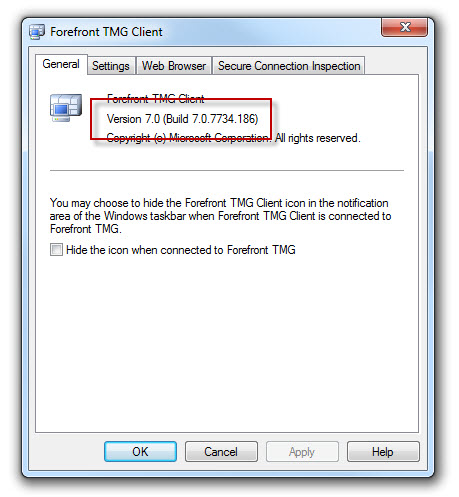
The Forefront TMG 2010 firewall client hotfix rollup can be downloaded here. After applying this hotfix rollup, the new Forefront TMG 2010 firewall client build number will be 7.0.7734.186.
Deploying IPv6 and Forefront UAG 2010 DirectAccess Technical Deep Dive
On Tuesday, September 20 2011, join me and Ed Horley at the Pacific IT Professionals Los Angeles event where we will be presenting a Technical Deep Dive on IPv6 and DirectAccess. During the first session, Ed will discuss in detail how to deploy IPv6 in a Microsoft enterprise network. During the second session I’ll dig in to Microsoft DirectAccess with Forefront Unified Access Gateway (UAG) 2010. The event begins at 6:00PM PDT and is being held at the Microsoft offices in downtown Los Angeles. For more information and to register for the event, click here.
Hope to see you there!
Southern California IT Professionals Association September Meeting
On Thursday, September 8 2011, I will be presenting an overview of Microsoft Forefront edge security solutions at the Southern California IT Professionals Association monthly meeting. During the session I’ll be providing an overview of Forefront Threat Management Gateway (TMG) 2010 and Unified Access Gateway (UAG) 2010, discussing common deployment scenarios, and highlighting the similarities and differences of the two solutions.
I will also be giving away copies of the Forefront Threat Management Gateway (TMG) 2010 Administrator’s Companion and the Forefront Unified Access Gateway (UAG) 2010 Administrator’s Handbook. The event begins at 6:30PM PDT and will be held at the CSU Fullerton campus in Irvine. For more information and to RSVP for the event, click here.
Hope to see you there!
Connect


 Richard Hicks' Forefront TMG Blog