Archive
TechDays San Francisco 2012
TechDays San Francisco 2012, sponsored by the Pacific IT Professionals user group, is a two day IT professional conference being held on March 23 and 24, 2012. The event features a lineup of speakers that includes Chris Avis, CA Callahan, Jennelle Crothers, Jessica DeVita, Steve Evans, Jason C. Helmick, Chris Henley, Ed Horley, Darren Mar-Elia, Mark Minasi, Stephen Rose, Joey Snow, Doug Spindler, Mark Vinkour, Harold Wong, and Chris Zwergel. Sessions will cover topics such as Azure and cloud, Clustering, DNS/DHCP/IPAM, Exchange, Hyper-V, IIS, Lync, MDOP, networking and VPN, Powershell, SharePoint, System Center, VDI, Windows 8 Client and Server, and Windows Phone 7. I will be presenting sessions on Forefront Edge Security (Forefront TMG 2010 and UAG 2010) as well as DirectAccess. Visit the TechDaysSF web site for the full speaker lineup and session abstracts, then click here to register for the event. Hope to see you there!


WPAD Considerations for Kerberos Authentication with NLB VIP on Forefront TMG 2010
As I outlined in a recent article on ISAserver.org, Service Pack 2 (SP2) for Forefront TMG 2010 supports Kerberos authentication in load-balanced scenarios when web proxy clients are configured to use the virtual IP address (VIP) of the array. However, using Web Proxy Automatic Discovery (WPAD) with either DNS or DHCP poses a challenge for organizations that choose to take advantage of this new feature. When using WPAD, the web proxy client retrieves the automatic configuration script from the Forefront TMG firewall. The script provides the web proxy client with the IP addresses (or hostnames, if configured) of the individual array members. In this configuration, the web proxy client will send its request to one of the array members returned by function MakeProxies() and not to the VIP, as desired.
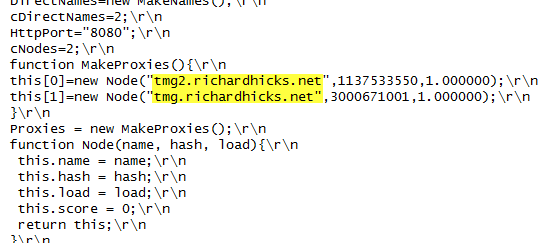
To work around this issue you can configure a separate web server to host the automatic configuration script. You can use any web server you wish, just make sure that it is highly available and don’t forget to configure the MIME type application/x-ns-proxy-autoconfig for the file extension you choose (typically .DAT or .PAC). Full details about how to do this can be found here. You can create your own Proxy Automatic Configuration (PAC) file from scratch, or you can simply retrieve the automatic configuration script from TMG, modify it to use the IP address (or preferably the hostname or FQDN) of the Forefront TMG array’s VIP, and place that on the web server for clients to retrieve. This means that the automatic configuration script will have to be updated manually, as required. This could be automated by writing a script that periodically retrieves the automatic configuration script from the Forefront TMG firewall, modifies it appropriately, and then saves it on the web server if you were really clever! Another alternative is to configure the Forefront TMG 2010 firewall to return a customized automatic configuration script. You can find details about this configuration here.
ESET Gateway Security Beta for Forefront TMG 2010
For security administrators looking to improve upon Forefront TMG 2010’s already strong advanced web protection features, leading anti-virus vendor ESET recently announced the beta availability of its Gateway Security for Forefront TMG 2010 software. ESET Gateway Security for Forefront TMG delivers advanced, gateway-integrated virus and malicious software scanning to provide comprehensive protection for web-based protocols like HTTP and FTP. ESET Gateway Security for Forefront TMG also supports SMTP, IMAP, and POP3 protocols to provide anti-malware and anti-spam capabilities for added protection. In addition, ESET Gateway Security for Forefront TMG 2010 includes host-based security for the TMG firewall’s underlying operating system, as well as automatic file exclusion configuration to ensure compatibility with Forefront TMG. ESET Gateway Security for Forefront TMG 2010 is fully compatible with existing ESET centralized management tools and supports Microsoft ISA Server 2006. Download the beta today!

Hotfix Rollup 1 for Forefront TM 2010 SP2 Now Available
A hotfix rollup for Forefront TMG 2010 SP2 is now available. The hotfix rollup resolves several reported issues with TMG, including:
KB2654016 – A client may be unsuccessful in accessing a Java SSO application published to the web by Forefront TMG 2010
KB2653703 – “Error: Subreport could not be shown” error message in the User Activity or Site Activity report in Forefront TMG 2010
KB2654585 – UDP packets may become backlogged when you increase the “maximum concurrent UDP sessions per IP address” setting in Forefront TMG 2010
KB2624178 – Forefront TMG 2010 administrators may be unable to generate reports
KB2636183 – Both sides of a TCP connection are closed when the client or remote application half-closes the TCP connection in Forefront TMG 2010
KB2653669 – Summary information for the Top Overridden URLs table and for the Top Rule Override Users table display incorrect information in Forefront TMG 2010
KB2617060 – Forefront TMG 2010 enables L2TP site-to-site connections in RRAS
KB2655951 – Japanese characters in the subject line of an Alert email message are not readable in the Japanese version of Forefront TMG 2010
KB2654068 – “The Web Listener is not configured to use SSL” warning message may occur when you configure a Web Listener to use a valid SSL certificate in Forefront TMG 2010
KB2654193 – You receive a “Bad Request” error message when you try to access Outlook Web App published by Forefront TMG 2010
KB2654074 – String comparison may become case-sensitive when you published a website using Forefront TMG 2010
KB2658903 – Forefront TMG 2010 firewall service (wspsrv.exe) may crash frequently for a published website secured by SSL after you install Service Pack 2.
Hotfix rollup 1 for Forefront TMG 2010 SP2 can be downloaded here. After applying this update, the new Forefront TMG 2010 build number will be 7.0.9193.515.
Configuring Forefront TMG 2010 HTTPS Inspection Inclusion List
When HTTPS inspection is configured and enabled on a Forefront TMG 2010 firewall, the administrator has the option to define web sites to exclude from HTTPS inspection. This may be required for a variety of reasons. For example, an administrator may need to exclude certain destinations to address privacy concerns, or perhaps HTTPS inspection breaks an application that uses SSL to tunnel non-HTTP protocols. All HTTPS web sites are inspected except for those sites defined as Destination Exceptions.

Beginning with Service Pack 2 (SP2) for Forefront TMG 2010, administrators can now define an explicit inclusion list for HTTPS inspection. Sites included on this list will be subject to HTTPS inspection, while all other destinations will be excluded. To define an HTTPS inspection inclusion list, create a Domain Name Set and populate it with those destinations for which you explicitly want to enforce HTTPS inspection.

After saving and applying the configuration, copy this VBScript file to the TMG firewall, then open an elevated command prompt and type the following command:
cscript.exe ConfigureHTTPSiInclusionList.vbs <DomainNameSetName>
Substitute <DomainNameSetName> in the command above with the name of the Domain Name Set created earlier. Once configured, the Destination Exceptions tab of the HTTPS Outbound Inspection properties will be greyed out, and only those sites included in the Domain Name Set defined as the HTTPS inspection inclusion list will be subject to HTTPS inspection. All other destinations will be excluded. You can still define Source Exceptions as needed, however.

Only one Domain Name Set can be specified as the HTTPS inspection inclusion list. Running the command without parameters removes any configured inclusion list and returns HTTPS inspection back to its original state.
For more information regarding HTTPS inspection inclusion lists, refer to KB2619986.
Connect


 Richard Hicks' Forefront TMG Blog