Archive
Security Update for Microsoft ISA Server 2006 and Forefront Threat Management Gateway (MS09-016)
Microsoft today announced the availability of a security update for Microsoft ISA Server 2006 and Forefront Threat Management Gateway. This update addresses two vulnerabilities; Web Proxy TCP State Limited Denial of Service Vulnerability [CVE-2009-0077] and a Cross-Site Scripting Vulnerability [CVE-2009-0237]. Please refer to Microsoft Knowledge Base Article 961759 for more information.
Using the ISA HTTP Filter To Modify Via Headers And Prevent Information Disclosure
The ISA firewall’s powerful HTTP filter allows us to inspect and modify HTTP request and response headers at a very granular level. The HTTP filter by default will allow only valid, RFC compliant HTTP communication to pass through it, and it will also limit the length of request headers. The HTTP filter is highly configurable though, allowing us to control which types of HTTP methods are allowed, which file extensions are allowed, which request or response headers are allowed, as well as giving us the ability to block content containing specific signatures defined by the ISA firewall administrator. Most often these advanced inspection features are used to block specific content using HTTP, such as instant messaging or peer-to-peer applications, or to prevent certain types of attacks against our systems by searching for and blocking communication based on a given string contained in request and response headers and bodies
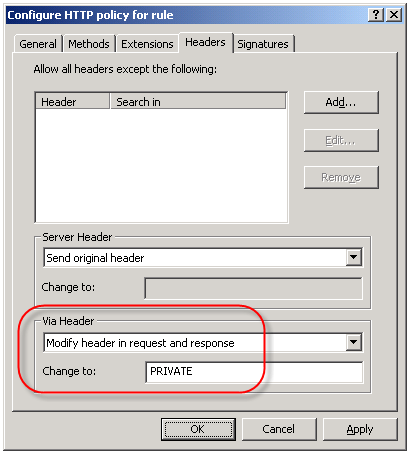
An often overlooked use of the HTTP filter is the ability to control the HTTP Via header. The HTTP Via header is required when a proxy intermediates requests between a user and a remote host (http://www.w3.org/Protocols/rfc2616/rfc2616-sec14.html – section 14.45). By default, the HTTP filter sends the default header, which is the hostname of the ISA firewall that handled the request. Since the hostname of your ISA firewall could (and should) be considered sensitive information, it is a good idea to configure the HTTP filter to send something other than the default header. This is accomplished by right-clicking on each access rule that includes HTTP as a defined protocol and choosing ‘Configure HTTP’. Select the ‘Headers’ tab, then select the option to ‘Modify header in request and response’. In the ‘Change to:’ field, enter something ambiguous. Typically I enter ‘PRIVATE’. If you have multiple ISA firewalls handling outbound Internet communication you may wish to choose something that is ambiguous but still allows you to identify which firewall processed the request, such as FW1.
ISA Server Detected Routes…
Another common ISA alert that I often get questions about is the following:
“ISA Server detected routes through the network adapter [network interface] that do not correlate with the network to which this network adapter belongs. When networks are configured correctly, the IP address ranges included in each array-level network must include all IP addresses that are routable through its network adapters according to their routing tables. Otherwise valid packets may be dropped as spoofed. The following ranges are included in the network’s IP address ranges but are not routable through any of the network’s adapters: [address ranges];. Note that this event may be generated once after you add a route, create a remote site network, or configure Network Load Balancing and may be safely ignored if it does not re-occur.
The routing table for the network adapter [network interface] includes IP address ranges that are not defined in the array-level network [network object], to which it is bound. As a result, packets arriving at this network adapter from the IP address ranges listed below or sent to these IP address ranges via this network adapter will be dropped as spoofed. To resolve this issue, add the missing IP address ranges to the array network. The following IP address ranges will be dropped as spoofed: [network object][address ranges];”
Essentially what this alert means is that there is a there is a mismatch between the configuration of the network object in the ISA management console and the routing table of the corresponding network interface. If you are not experiencing any network connectivity issues, or you just made changes to your network configuration, you can probably safely disregard this message. You will not, in most cases, see this message again. If you are seeing this alert on a consistent basis however, you might wish to look at your networking configuration more closely. For the networking to work correctly on the ISA firewall, each network interface should contain routes that correspond to any networks that are reachable through that particular network interface. The network objects in the ISA management console should be configured to include this network and all reachable networks as well. This is critical because if the routing table is configured to include networks that are not included in the ISA network object, the ISA firewall will reject this traffic as spoofed.
There are times when you will have network objects configured with addresses or networks that do not have routes associated with them, and in which case you will see this alert. A case in point would be when a situation arises that you need to exclude a particular address , address range, or subnet that your underlying routing infrastructure routes through another gateway. A common scenario that I have encountered is when registered IP addresses are used for private connectivity over dedicated circuits when connecting to business partners. In this case I would include the IP address(es) of the business partner in the ‘Internal’ network object so that my web proxy and firewall clients would bypass the ISA firewall when communicating with hosts on these networks.
ISA Connectivity Verifier Refresh Rate
One of the advanced features of the Microsoft ISA firewall’s monitoring capabilities is the connectivity verifier. A connectivity verifier allows us to monitor services on remote hosts that the ISA firewall depends upon to provide service (such as infrastructure services like DNS or Active Directory domain controllers), or perhaps that the ISA firewall is responsible for protecting (such as a published server). When you configure a connectivity verifier, you have the option to choose from one of three methods of verifying connectivity; you can send an HTTP ‘GET’, send a ping (ICMP) request, or establish a TCP connection to a specific port (obviously your best choice!). In the event a monitored resource fails to respond to a connectivity verifier, a no connectivity alert is raised for which you can configure any number of responses, such as recording the event in the event log, sending an e-mail to an administrator, stopping or starting services, or running a program. We also have the ability to control the number of times an event occurs before the alert is triggered, as well as what happens when the alert thresholds are met subsequent to the alert.
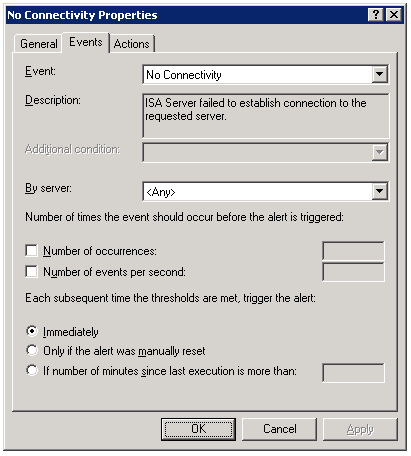
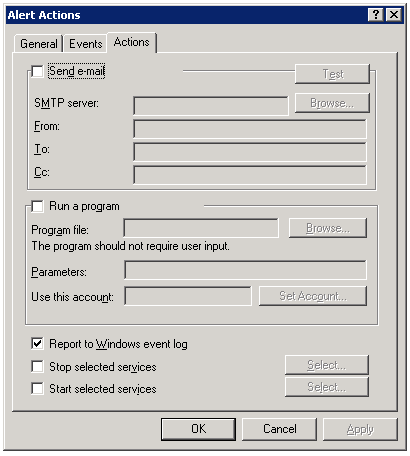
By default, connectivity verifiers are configured to perform their checks once every thirty seconds. In some instances, however, this may not be adequate. While there is no option in the GUI to alter this parameter, it is exposed via COM. Please refer to the Microsoft KB article Setting the Refresh Rate for Connectivity Verifiers for more information and to find the VBScript that allows this configuration change to be made.
Automatic Detection Fails for ISA Firewall Clients
When configuring the Web Proxy listener on a Microsoft ISA firewall, one of the things you will find in addition to the authentication methods available is an option to ‘require all users to authenticate’.
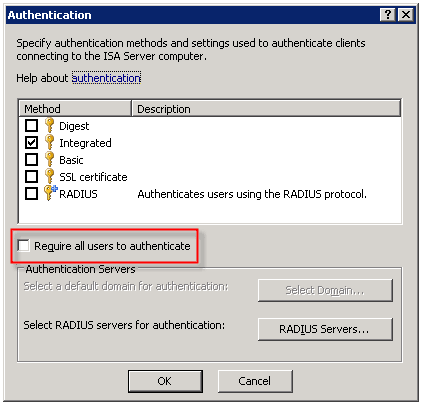
Selecting this option produces the following warning message:
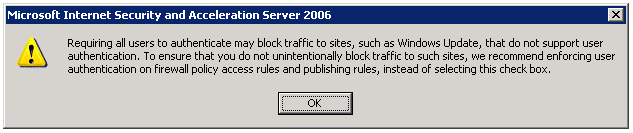
Now why would Microsoft give us this option, then complain when we attempt to use it? I have no idea. But it is important to read this message thoroughly and understand what it is saying and why.
As the message indicates, requiring all users to authenticate may block traffic to sites such as Windows Update. The reason for this is that the Windows Update client on our servers and workstations runs in the background, under the context of the service host (svchost.exe) and is unable to provide authentication information to the ISA firewall. This same scenario applies to any unattended processes or services you might have running that require access to the Internet.
One thing that the warning message does not mention is that requiring all users to authenticate to the Web Proxy listener also breaks the automatic detection mechanism for Firewall Clients. The reason for this is that the ISA Firewall Client lacks the ability to respond correctly to the ‘HTTP 401 Unauthorized’ response that the ISA firewall returns when the Firewall Client attempts to retrieve the ‘wspad.dat’ file.
As the aforementioned warning goes on to say, Microsoft recommends enforcing user authentication on firewall policy access rules and publishing rules instead of requiring all users to authenticate to the Web Proxy listener. In this case it would seem that just because you can, doesn’t mean you should. If you must for some reason enable this setting (and honestly, I can’t think of any reason you would need to) there are some workarounds to allow automatic detection by the Firewall Client under these circumstances. Refer to Microsoft knowledge base article 88563 for more information.
Connect


 Richard Hicks' Forefront TMG Blog