Microsoft and Celestix TMG/UAG Lunch and Learn Sessions
I am pleased to announce that Microsoft, along with my employer Celestix Networks, will be hosting a series of ‘Lunch-n-Learn’ meetings at Microsoft offices on the west coast in January 2010. If you are interested in hearing more about Microsoft Forefront Threat Management Gateway, Unified Access Gateway, and the Celestix hardware appliance platform, you are invited to attend one of the following sessions:
January 20, 2010 – Bellevue, Washington
January 21, 2010 – Irvine, CA
January 26, 2010 – Portland, OR
Click here for more information and to register for an event near you. Hope to see you there!


Re-perimeterization Article for e92plus Reseller Magazine
Recently I was asked to write an article for the new reseller magazine produced by e92plus, a large security products distributor based in the U.K. In this article I discuss a concept known as ‘re-perimeterization’ (sometimes referred to as de-perimeterization). This is an idea that has been talked about for years, and the new Network Inspection System (NIS) functionality included with Forefront Threat Management Gateway (TMG) can make this a reality. Read the article here [PDF].

Microsoft ISA Server 2004/2006 Migration to Forefront Threat Management Gateway (TMG)
Jim Harrison and Mohit Saxena discuss Forefront Threat Management Gateway (TMG) migration strategies with David Tesar in this video on TechNet Edge.

Forefront Threat Management Gateway (TMG) Interview with David Cross
For a high-level overview of Microsoft Forefront Threat Management Gateway 2010, watch this TechNet Edge interview with TMG Program Unit Manager David Cross. David discusses the new features and functionality included in TMG and explains the differences between TMG and UAG.
Forefront Threat Management Gateway (TMG) 2010 – RTM Now Available!
Great news! Microsoft Forefront Threat Management Gateway (TMG) 2010 RTM is now available!

Sysinternals NewSID Utility Retired
If you frequently work with virtual machines like I do, you have most likely used the Sysinternals tool NewSID to generate new machine SIDs for your cloned systems. If you’ve attempted to use NewSID on a Windows Server 2008 R2 system, you no doubt have discovered (as I did) that NewSID no longer works! As a workaround I reverted to using sysprep, anxiously awaiting an update to the utility that I have used for over ten years on an almost daily basis it seems. I was surprised when I read the news that NewSID would be retired, but this post from Mark Russinovich explains the reasoning behind retiring the tool, and also explains the myth of machine SID duplication. As it turns out, generating a new machine SID was never really necessary in the first place. Who knew!
Microsoft Security Intelligence Report (SIR) v7 Now Available
The semi-annual Microsoft Security Intelligence Report is now available for download from the Microsoft Malware Protection Center. This latest report, volume 7, focuses on the first half of 2009. Once again, the report underscores the importance of maintaining security updates and provides strong evidence that security features in the latest Microsoft operating systems significantly reduce the chance of infection from viruses and malware.
Performance Analysis of Logs (PAL) v2.0 Technology Preview
The Performance Analysis of Logs (PAL) tool, developed by Microsoft Premiere Field Engineer (PFE) Clint Huffman, is a very powerful free tool available on CodePlex that makes the analysis of logged performance data much simpler. The utility is used to automate the assessment of a performance monitor counter log (in any format) and compares that information to known thresholds provided with the tool. It produces reports in HTML format and will generate alerts when thresholds are exceeded.
The current release (v1.35) is written in VBScript. The v2.0 release of PAL has been completely rewritten in PowerShell, and is now available as a very early technology preview. PAL does not require installation, but it does have some dependencies; PowerShell v1.0 or higher, Microsoft .Net Framework 3.5 SP1, and Microsoft Chart Controls for Microsoft .NET Framework 3.5.
PAL includes threshold files for most major Microsoft products, including IIS, MOSS, SQL Server, BizTalk, Exchange, and Active Directory. ISA and Forefront Threat Management Gateway support will be added in the near future.
Download Performance Analysis of Logs (PAL) v2.0 Technology Preview today!
MSDE Performance with Microsoft ISA Server 2006
I realize that MSDE performance is an oxymoron, but the performance of the MSDE database included with Microsoft ISA Server 2006 is essential to the operation of the ISA firewall. By default, if ISA is unable to write log data to the database, the firewall will enter lockdown mode and stop servicing requests. To ensure the availability of the ISA firewall, it is important to understand the limitations that are inherent with MSDE, and also the steps to take to improve performance when logging to an MSDE database.
There are several logging options to choose from when installing ISA. Selecting the ‘advanced logging’ feature will install the Microsoft SQL Server 2000 Desktop Engine (MSDE) database to support logging.
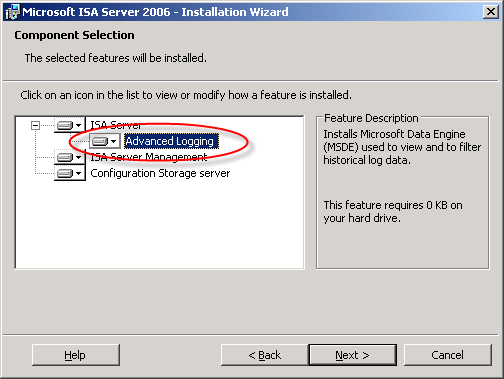
The advanced logging option using MSDE requires more resources than text file logging (in terms of processor utilization, memory consumption and disk I/O), but unlike text file logging there is the added benefit of viewing historical log data in the ISA management console.
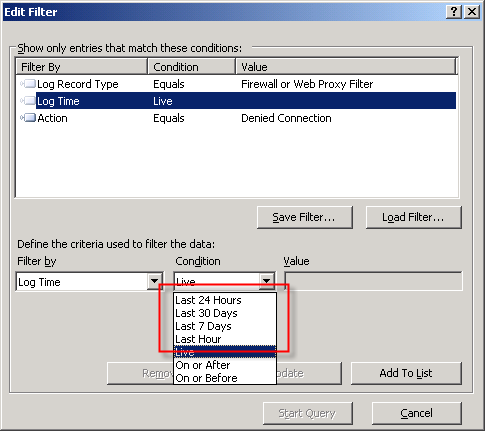
To be honest, I have never been a fan of using MSDE with ISA. In terms of performance, it is not very robust. MSDE was designed originally as an alternative to the Jet database engine included with Microsoft Access and was never intended to be used for enterprise applications. MSDE is based on SQL Server 2000, which by my math is over nine years old as of this writing. That is an eternity in technology time. Also, MSDE on ISA limits the database size to 1.5GB, and by design includes a workload governor that can impede performance in busy environments. Personally, I prefer text logging because it is much more robust, scalable, and higher performing, especially in very busy enterprise deployments. For me, the need to view historical data in the ISA management console is not critical, as I am comfortable with looking through text log files using the command line. I make liberal use of utilities such as findstr.exe and tail.exe (the latter of which is included in the Windows Server 2003 Resource Kit tools), as well as the Microsoft Log Parser. That’s just me though. : )
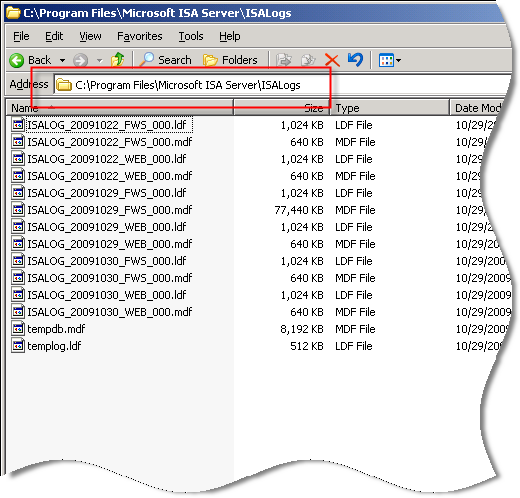
Of course there are many small and mid-sized deployments for which MSDE is perfectly suited and quite capable of performing adequately. In those scenarios, it is important that we follow some implementation best practices and perform additional maintenance to ensure optimum performance when using MSDE. First and foremost, the MSDE database files should be placed on a separate partition from the system partition. This will reduce disk contention and file fragmentation. By default, the log files are contained in the \Program Files\Microsoft ISA Server\ISALogs folder on the system partition.
You can change the location of the database files by opening the ISA management console, highlighting ‘Monitoring’, then selecting the option to ‘Configure Firewall Logging’ or ‘Configure Web Proxy Logging’.
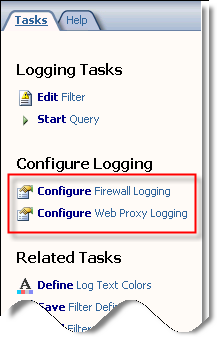
Next, click the ‘Options…’ button next to the ‘MSDE Database’ option, then select the radio button next to ‘This folder (enter full path):’ and specify a location to store the log files. If you are making this change on an ISA Enterprise array, this location must exist on ALL array members. You have the option to use a system variable here, such as %logdrive%, which can simplify configuration for enterprise deployments.
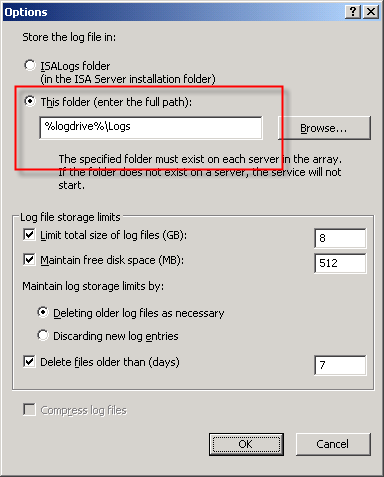
Although less critical when you have a separate partition for the log files, disk fragmentation can reduce MSDE performance as well. You can use the native Windows disk defragmentation tool (defrag.exe) to defragment the partition, or if you prefer only to defragment the database files themselves you can use contig.exe from Sysinternals.
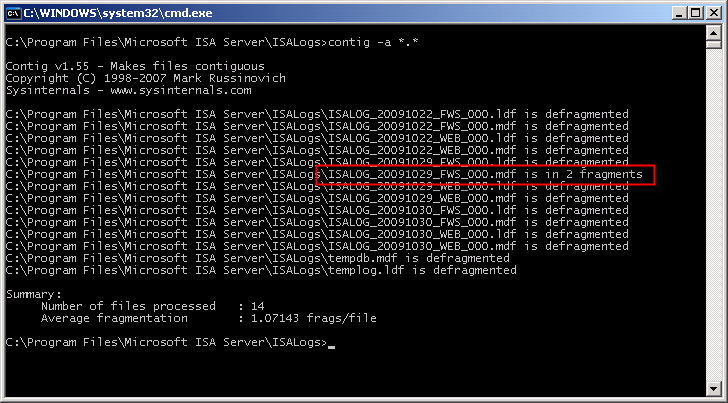
Note: This screen shot is from a little used test machine, so the level of fragmentation is minimal. On a busy system that has been in production for years, there will almost certainly be more fragmentation than you see here.
In addition to the best practices outlined above, another way to improve MSDE performance is to reduce the amount of data logged in the first place. This can be accomplished in several ways. To begin, review the log fields that are selected by default. You can find the log fields on the Firewall or Web Proxy logging properties window and clicking on the ‘Fields‘ tab. If there are fields that contain information that aren’t required, deselect them. Some fields that are enabled by default and are commonly omitted are the bytes sent and received (and delta) fields and processing time (and delta) fields. Review all of the log fields to determine the minimum data required.
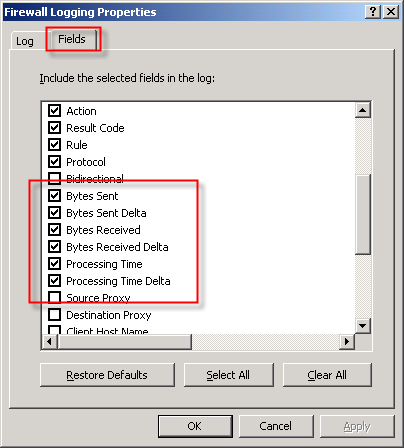
You might also consider not logging traffic processed by the default deny rule. While this can significantly reduce the amount of data logged in busy environments, it does reduce visibility in to what types of traffic the ISA firewall is rejecting. A better alternative is to create specific access rules for uninteresting traffic (e.g. DHCP requests, NetBIOS name resolution broadcasts, etc.) and configure the rule not to log requests that match.
You can also disable the option to log traffic blocked by flood mitigation settings. Flood mitigation settings can be found in the ISA management console by expanding the ‘Configuration’ node, highlighting the ‘General’ node, then click on the ‘Configure Flood Mitigation Settings’ link.

Considering the many limitations imposed by MSDE, you might think that using a remote SQL server is the answer to all of these problems. Having a dedicated system running the latest version of SQL would certainly better than MSDE. However, network connectivity issues and throughput can potentially impede performance using this option. Thankfully Forefront Threat Management Gateway 2010 includes some significant enhancements to logging that address these issues. First, the native database logging option now uses SQL 2008 Express, which is a big improvement over MSDE. Also, TMG database logging now includes an option to queue logged data locally if for any reason the database is unreachable. The log queuing feature of TMG now makes remote SQL logging a viable and compelling option for logging in the future.
For additional information about remote SQL logging, see my previous posts Remote SQL Logging with Microsoft ISA Server 2006 and A Few Notes Regarding Remote SQL Logging with Microsoft ISA Server and Forefront Threat Management Gateway.
For more detail about how logging works in ISA, and for additional information on the various logging options available, please refer to the Monitoring, Logging, and Reporting Features in ISA Server 2006 document on TechNet.
Microsoft Forefront Threat Management Gateway Administrator’s Companion – Pre-Order Now!
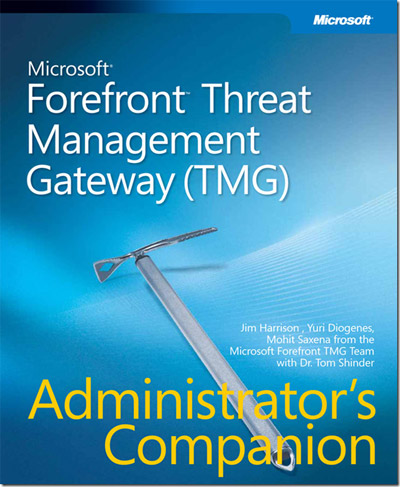
Excellent news! Forefront Threat Management Gateway Administrator’s Companion, authored by Jim Harrison, Yuri Diogenes, Mohit Saxena and reviewed by Dr. Tom Shinder is now available for pre-order on Amazon.com!
Connect


 Richard Hicks' Forefront TMG Blog