RunAs Radio Appearance
Recently I was invited to be a guest on RunAs Radio, a weekly Internet audio talk show for IT professionals working with Microsoft products. I had the opportunity to chat with hosts Richard Campbell and Greg Hughes about the Microsoft ISA firewall, the forthcoming release of Threat Management Gateway, as well as the Celestix MSA security appliance. RunAs Radio has been around since 2007 and has featured guests such as Mark Minasi, Clint Huffman, Steven Choy, Brian Komar, and Steve Riley, just to name a few.
Forefront Threat Management Gateway Program Manager Interview
An interview with Ori Yosefi, Threat Management Gateway Program Manager, about the recently released Microsoft Forefront Threat Management Gateway – Beta 2.
Forefront Threat Management Gateway Beta 2 – Now Available!
The second beta for the forthcoming release of Microsoft Threat Management Gateway is now available. The new features in this latest beta release are impressive! Among them are support for ISP redundancy (multiple gateways!), advanced intrusion prevention, anti-malware scanning for both e-mail and web traffic, forward SSL content inspection with selective inspection capabilities, and URL filtering. This product is now a comprehensive unified threat management system that is tightly integrated, easy to deploy and manage, and will afford exponentially improved security protection over Microsoft ISA Server 2006.
ISA Connectivity Verifier Refresh Rate
One of the advanced features of the Microsoft ISA firewall’s monitoring capabilities is the connectivity verifier. A connectivity verifier allows us to monitor services on remote hosts that the ISA firewall depends upon to provide service (such as infrastructure services like DNS or Active Directory domain controllers), or perhaps that the ISA firewall is responsible for protecting (such as a published server). When you configure a connectivity verifier, you have the option to choose from one of three methods of verifying connectivity; you can send an HTTP ‘GET’, send a ping (ICMP) request, or establish a TCP connection to a specific port (obviously your best choice!). In the event a monitored resource fails to respond to a connectivity verifier, a no connectivity alert is raised for which you can configure any number of responses, such as recording the event in the event log, sending an e-mail to an administrator, stopping or starting services, or running a program. We also have the ability to control the number of times an event occurs before the alert is triggered, as well as what happens when the alert thresholds are met subsequent to the alert.
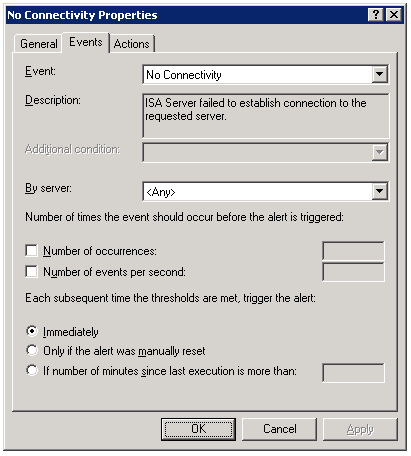
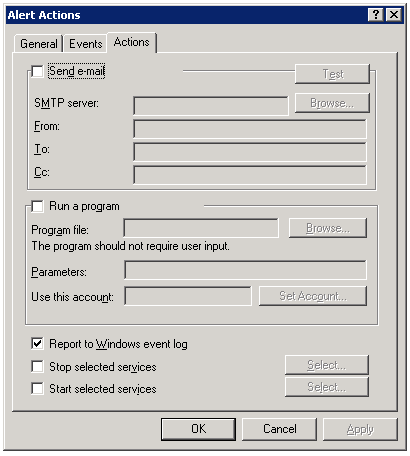
By default, connectivity verifiers are configured to perform their checks once every thirty seconds. In some instances, however, this may not be adequate. While there is no option in the GUI to alter this parameter, it is exposed via COM. Please refer to the Microsoft KB article Setting the Refresh Rate for Connectivity Verifiers for more information and to find the VBScript that allows this configuration change to be made.
Automatic Detection Fails for ISA Firewall Clients
When configuring the Web Proxy listener on a Microsoft ISA firewall, one of the things you will find in addition to the authentication methods available is an option to ‘require all users to authenticate’.
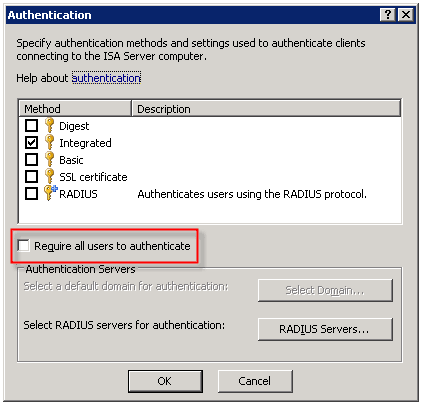
Selecting this option produces the following warning message:
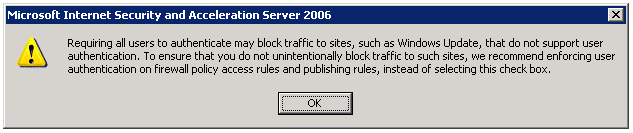
Now why would Microsoft give us this option, then complain when we attempt to use it? I have no idea. But it is important to read this message thoroughly and understand what it is saying and why.
As the message indicates, requiring all users to authenticate may block traffic to sites such as Windows Update. The reason for this is that the Windows Update client on our servers and workstations runs in the background, under the context of the service host (svchost.exe) and is unable to provide authentication information to the ISA firewall. This same scenario applies to any unattended processes or services you might have running that require access to the Internet.
One thing that the warning message does not mention is that requiring all users to authenticate to the Web Proxy listener also breaks the automatic detection mechanism for Firewall Clients. The reason for this is that the ISA Firewall Client lacks the ability to respond correctly to the ‘HTTP 401 Unauthorized’ response that the ISA firewall returns when the Firewall Client attempts to retrieve the ‘wspad.dat’ file.
As the aforementioned warning goes on to say, Microsoft recommends enforcing user authentication on firewall policy access rules and publishing rules instead of requiring all users to authenticate to the Web Proxy listener. In this case it would seem that just because you can, doesn’t mean you should. If you must for some reason enable this setting (and honestly, I can’t think of any reason you would need to) there are some workarounds to allow automatic detection by the Firewall Client under these circumstances. Refer to Microsoft knowledge base article 88563 for more information.
Scripting with Microsoft ISA Server 2006
One of my very favorite things about the Microsoft ISA firewall is the fact that you can do just about anything by leveraging the ISA Server administration COM object. Through scripting you can alter the configuration, automate repetitive or complex tasks, gather session information, import and export data, and much more. Here is a short example of a script that will display the version information for the ISA software you are running:
Option Explicit
Dim Root, Server
Set Root = CreateObject(“FPC.Root”)
Set Server = Root.GetContainingServer
WScript.Echo Server.ProductVersion
Set Server = Nothing
Set Root = Nothing
If you are interested in scripting the ISA COM object at all, ISA Server Administration Scripting on MSDN is a great place to get started. There you will also find a complete reference to all of the ISA related COM objects, as well as some sample scripts. There are some great web sites that have some excellent ISA scripts you can download and use as is. Jim Harrison’s ISATools.org is an excellent resource, as is Jason Fossen’s ISAScripts.org.
ISA Firewall Client Command Line Options
The Microsoft ISA Server Firewall Client is a wonderfully amazing piece of software that allows you to very granularly control network communication on hosts which it is installed (you can download it here). If you are not familiar with the Firewall Client, it is a software component that can be installed on Windows hosts that allows you to proxy any TCP or UDP based communication. There is no need to configure individual applications to work with the Firewall Client. It is a layer service provider that transparently intercepts Winsock calls and if the destination is remote, the Firewall Client sends that communication to the ISA firewall. Your routing infrastructure becomes transparent to your clients, and you gain the ability to enforce user and group based access control. Best of all, the Firewall Client logs not only the user name for each request, but the application that made the request as well. Very powerful stuff!
Troubleshooting Firewall Client communication can sometimes be difficult, however. Thankfully enough, there is a command line utility included with the Firewall Client that makes that job much easier. If you navigate to the ‘Program FilesMicrosoft Firewall Client 2004’ folder you will find a program called ‘fwctool.exe’. This tool allows you to do things like enable and disable the client software itself:
fwctool.exe enable
fwctool.exe disable
It can also be used to display the version of the Firewall Client software you currently have installed:
fwctool info
You can alter the configuration of the Firewall Client:
fwctool SetManualServer
fwctool SetAutoDetectServer
And you can display the current configuration information as well:
fwctool PrintConfig
fwctool PrintServerConfig
fwctool PrintUserConfig
fwctool PrintGlobalConfig
The Firewall Client has the ability to automatically configure the web browser that is installed on the workstation. This option can be displayed, enabled, or disabled from the command line as well:
fwctool DisplayBrowserConfig
fwctool EnableBrowserConfig
fwctool DisableBrowserConfig
You can also verify connectivity to the ISA firewall by using the PingServer option:
fwctool PingServer
I absolutely love the Firewall Client because of its power and flexibility. Having the ability to leverage strong user and group based authentication on ALL TCP and UDP protocols is fantastic. Look for more posts here on my blog about the Firewall Client and how to troubleshoot it as well as to leverage it.
ISA Behind a Cisco ASA?
Several people have written to me in response to my earlier blog post ‘HTTP 2.0 Specification?‘ asking why I would have my ISA firewall behind a Cisco ASA. The answer is simple: enhanced security! I am following a long standing security best practice by implementing security in layers; defense in depth. Now, it’s not that the ISA firewall isn’t totally and completely capable of acting as an edge firewall, because it most certainly is. In this case though, I have elected to use an ASA as my edge firewall because I don’t need any real intelligence there. All I want is to do some very simple packet filtering here; basically just filtering out the bulk of the noise from the Internet and allowing my internal ISA firewall, with its advanced deep application layer inspection capabilities and granular user and group based access controls to do the important network communication inspection.
In addition to enhanced security, there are some other benefits to using the ASA (or another firewall) at the network edge. If someone were to circumvent the access controls that are in place on that edge firewall, they would not be able to use those same methods of exploitation on the ISA firewall. If I practice security in layers but deploy the same model firewall at each layer, an attacker can use the same method used to bypass my internal firewalls as they used to bypass my edge firewall.
An additional benefit by using another firewall at the network edge is that by squelching ‘Internet noise’, the logs on the ISA firewall become much more meaningful. It allows me to find important information much more quickly than having to sift through mountains of data this is mostly port scans and probes that occur constantly on the public Internet. This also frees up resources on my ISA firewall that are better put to use on inspecting important traffic.
HTTP 2.0 Specification?
I wanted to share with everyone what I thought was an entertaining issue that was brought to my attention by one of our (Celestix) support engineers recently. The issue was a classic one for most seasoned ISA firewall administrators; 502 proxy error (request not supported) when accessing a specific site, but the same site can be reached without issue behind any other firewall or router. Clearly the ISA firewall, with its deep application layer inspection capabilities, is objecting to something in the communication stream and denying our request. Now, there are plenty of other documented examples of this type of scenario, but what I found particularly entertaining about this specific one (and hence compelled to write about it here) was the response I see coming from the remote web server…
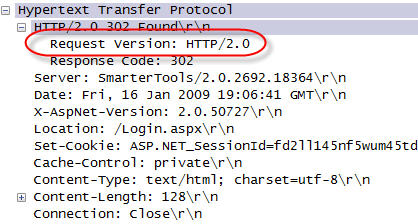
HTTP/2.0? This was not a specification I was aware of, but as a sanity check I posed this question to some folks that know a lot more about this stuff than I do. Thankfully, Jim Harrison did confirm for me that HTTP/2.0 is not a valid specification. Thanks Jim!
Again, this is a fairly common scenario when you deal with the ISA firewall. Because the ISA firewall is capable of understanding communication at the application layer (layer 7), it is designed for security reasons to disallow ANY non-RFC compliant communication. That includes any fictitious HTTP specifications that vendors decide to dream up as well. And once again, this is another shining example of the power and security of the ISA firewall. With these advanced features, the ISA firewall does far more to protect your network communication than any firewall on the market today. In this instance, had this been a malicious site, any other firewall (certainly my ASA!) would blindly allow the communication.
TCP/IP Fundamentals for Microsoft Windows
I wanted to bring to your attention today a wonderful document authored by Joe Davies called ‘TCP/IP Fundamentals for Microsoft Windows‘. This is an incredible resource, with over 500 pages of detailed information regarding TCP/IP networking in Microsoft Windows. Recently it was updated to include information for Windows Server 2008. What is really amazing is that it is a free download! Joe Davies has authored (and co-authored) many Microsoft Press books on networking, including the TCP/IP Protocols and Services books, Understanding IPv6, Windows Server 2008 Networking and Network Access Protection (NAP), and many more. Joe is also the author of ‘The Cable Guy‘ column that is featured in Microsoft Technet magazine and online.
Connect


 Richard Hicks' Forefront TMG Blog