Fwengmon.exe and Forefront Threat Management Gateway (TMG) 2010
For engineers performing advanced troubleshooting on TMG, you have likely noticed that fwengmon.exe, a utility that you used with previous versions of ISA, no longer functions with TMG.
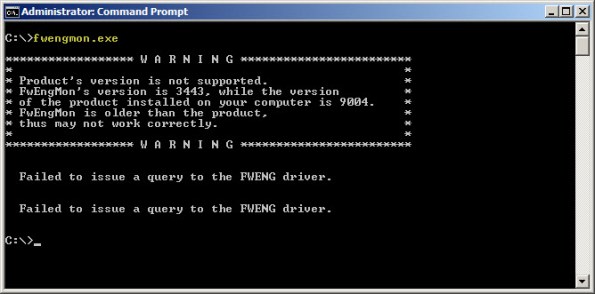
Not to worry! This detailed information is readily accessible using netsh.exe in the tmg context. The following is a list of common commands and their fwengmon.exe equivalents (where applicable):
To view creation objects, active sessions, NLB hook rules, NLB server assigned ranges, and dynamic and persistent allowed ranges:
netsh tmg show all
To view connections only (fwengmon.exe /session or /s):
netsh tmg show connections
To view detailed information about a specific connection (fwengmon.exe /s <ID>):
netsh tmg show connections <connection_number>
To view firewall creation elements (fwengmon.exe /creations or /c):
netsh tmg show creations
Note: You can sort and filter output from show connections or show creations by source IP address, source port, destination IP address, destination port, or protocol using the sort and filter parameters (fwengmon.exe /organize or /o, or fwengnmon.exe /filter or /f). You can also limit the number of connections or creations displayed using the display parameter. Type netsh tmg show connections ? or netsh tmg show creations ? for more information.
To show NLB hook rules (fwengmon.exe /querynlb or /n):
netsh tmg show nlbhookrules
To view packets held in kernel mode:
netsh tmg show holdpackets
To view packets held in user mode:
netsh tmg show usermodepackets
To view global firewall engine driver settings:
netsh tmg show global
To specify a temporary address range to exempt from firewall filtering (fwengmon.exe /allow or /a):
netsh tmg add allowedrange <beginning_ip> <ending_ip>
To specify a permanent address range to exempt from firewall filtering (fwengmon.exe /allow or /a):
netsh tmg add allowedrange <beginning_ip> <ending_ip> persistent
Note: netsh tmg add allowedrange allows all traffic to and from hosts within the IP address range specified to bypass stateful firewall inspection completely. It should be used for troubleshooting purposes only.
To delete a temporary address range (fwengmon.exe /noallow):
netsh tmg delete allowedrange id=<id>
To delete a permanent address range (fwengmon.exe /noallow):
netsh tmg delete allowedrange id=<id> persistent
Mail and OCS Server Publishing using TMG on Forefront Unified Access Gateway (UAG) 2010
In a recent post I outlined some of the basic differences between Forefront Threat Management Gateway (TMG) 2010 and Unified Access Gateway (UAG) 2010. Although I indicated that UAG includes TMG under the covers, TMG is intended to provide protection for the UAG host only. It cannot be used to provide firewall, outbound proxy, or VPN services. There are specific instances when leveraging the underlying TMG services is allowed and supported. As the UAG Support Boundaries indicate, you can use TMG on UAG for Exchange mail server publishing (SMTP/SMPTS, POP3/POP3S, and IMAP/IMAPS) and Office Communications Server (OCS) SIP traffic publishing (Communicator Web Access (CWA) should be published using UAG). This means that if you are planning to publish Exchange and OCS, you can accomplish this using UAG alone. You are not required to deploy TMG or another firewall to provide secure access to mail server-to-server communication or OCS SIP traffic.
TMG and IANA Unallocated Reserved Networks
Recently the engineers at Celestix UK brought an interesting issue to my attention. They were working with a customer to configure TMG to protect an internal network using the address space 192.0.0.0/24. When attempting to assign an IP address from this network to the Internal network interface of the TMG firewall they would receive the following error:
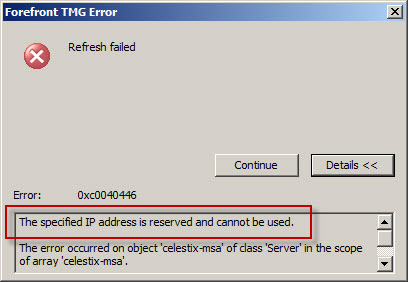
As it turns out, the 192.0.0.0/24 network is IANA reserved and not allocated (which is different than reserved allocated networks like RFC 1918 private address ranges, APIPA, loopback, multicast, etc.). This was news to me! As we discovered, you cannot configure any network interface on the TMG firewall using an address from any unallocated reserved network. Interestingly enough, my good friend Ed Horley pointed out there are many more IANA reserved networks that I was completely unaware of. You can find more information about those networks here.
If you have to configure a TMG firewall to protect an unallocated reserved network, your only options are to readdress the network using an allocated address range or place a router in front of TMG.
How to Determine TMG Version
Recently Tarek Majdalani, one of my fellow Forefront Edge Security MVPs, published an informative article detailing several ways to determine which version of TMG is installed. One additional method you can use to determine the version of TMG you are running is by using COM. The VBScript code looks like this:
Option Explicit

Dim Root, Server

Set Root = CreateObject("FPC.Root")
Set Server = Root.GetContainingServer

WScript.Echo Server.ProductVersion

Set Server = Nothing
Set Root = Nothing
Copy the code above and save it in a file with a .vbs extension, or download the script file here.
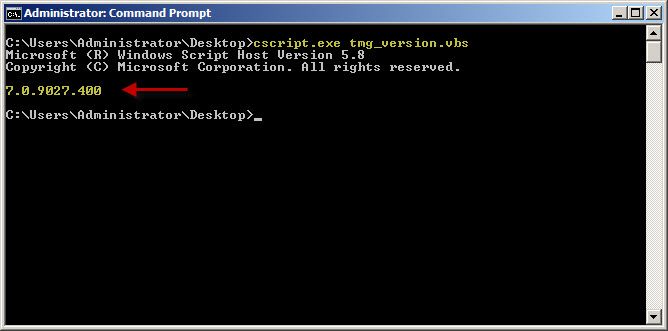
You can execute the script from the command line using cscript.exe using the following syntax:
cscript.exe <path_to_script_file>
The output of the command includes the TMG version and build number information.
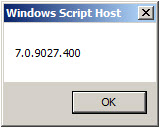
You can also double-click the script file in the GUI and a Windows message box will appear with the TMG version and build number information.
What are the Differences between TMG and UAG?
I am frequently asked “What are the differences between TMG and UAG?” and “Which one should I deploy?” In this post I will provide some background information that will hopefully answer those questions for you. This is not intended to be a comprehensive side-by-side feature comparison. It is only meant to provide a high-level overview of the basic differences between TMG and UAG.
Let’s begin by examining the features of each product:
- Microsoft Forefront Threat Management Gateway (TMG) 2010 is an integrated edge security gateway. It is a Common Criteria certified (EAL4+) enterprise-class application layer firewall that includes support for proxy services (forward and reverse proxy), content caching, and VPN (both remote access and site-to-site). It can be deployed in all of these roles, or any subset of them.
- Microsoft Forefront Unified Access Gateway (UAG) 2010 is a dedicated remote access gateway. It is Common Criteria certified (EAL2+) and provides browser-based remote access to published applications via an SSL VPN portal. It includes limited support for traditional client access VPN with Secure Socket Tunneling Protocol (SSTP) and Network Connector (a proprietary UAG component that provides network-level access). UAG can also serve as a DirectAccess gateway, a deployment scenario for which the UAG provides incredible value.
Fundamentally, TMG is a network-centric access control solution. With it you can provide fine-grained control over all types of communication going through the firewall, both web-based and non web-based protocols. TMG controls access inbound and outbound, and allows for the configuration of multiple perimeter (DMZ) networks.
By contrast, UAG is an application-centric remote access solution. It provides inbound access only; there are no outbound access capabilities provided by UAG. This is a common source of confusion, as UAG includes TMG under the hood. Many administrators mistakenly believe they can leverage the underlying TMG installation to provide forward proxy or VPN services. This is not supported. Other than mail server publishing, TMG may not be used for any other purpose. It is installed to provide protection for the UAG application only.
UAG takes one of the TMG deployment roles, the VPN/remote access role, and supercharges it. UAG includes advanced application publishing capabilities not provided by TMG, such as endpoint configuration and health detection, customizable data manipulation, session clean up, and more. For example, an administrator can allow full access to a published application to any system that has anti-virus software running and up-to-date, has the firewall enabled, and has the latest system updates applied. If the system does not meet these requirements, the administrator can determine if access should be granted with reduced privileges, or perhaps denied access altogether. An administrator might mask specific data sent to a user (such as credit card numbers, social security numbers, etc.) if the user is accessing the published web application from an untrusted device (non-managed workstation, kiosk, etc.). When the user closes their session, all temporarily downloaded files are removed from the workstation, ensuring that no sensitive data is left behind.
So when do you deploy TMG and when do you deploy UAG? If you want to control outbound web access (forward proxy or firewall), TMG is your only option. If you want to publish multiple applications with a single URL (an application portal), UAG is the answer. There are, however, areas where there is overlap between TMG and UAG capabilities. For example, let’s say you want to publish a single application such as Outlook Web App (OWA). Which solution do you choose? TMG can publish OWA quite capably, as can UAG. The answer depends on your specific requirements. If you need to restrict access to only those systems that meet your specific configuration requirements, publishing OWA with UAG is the solution. If you wish to grant access to OWA to anyone who authenticates successfully, then TMG will suffice.
Licensing often plays a role in determining which solution to deploy for remote access. UAG is licensed using Client Access Licenses, or CALs. Each user of the system is required to have a UAG CAL. The UAG CAL is included in the Microsoft Enterprise CAL (eCAL), so this may not be an issue for larger enterprises. TMG is licensed per processor. There are no CALs required for users of TMG (advanced web protection features do require the Web Protection Services Subscription license, however, which is licensed per user or per device annually). For more information, refer to the licensing FAQs for TMG and UAG.
In summary, TMG is a rock-solid firewall, proxy, content cache, and VPN access gateway that has basic support for application publishing. UAG is an advanced remote access gateway dedicated to application publishing, and is highly customizable and limited in functionality only by your programming skills, creativity, and imagination.
In a nutshell, think of TMG and UAG like this:
TMG – Keeps the bad guys out.
UAG – Lets the good guys in.
Microsoft Most Valuable Professional (MVP) 2010
I am very excited to announce that I have been awarded the Microsoft Most Valuable Professional (MVP) award for 2010! This is my second award, and it is a tremendous honor to be recognized for my efforts in promoting Microsoft Forefront edge security products worldwide. It is a wonderful privilege to be included among so many great professionals. Thank you to Microsoft for this prestigious award, and special thanks to my employer, Celestix Networks, who makes it possible for me to travel the world extoling the virtues of these great Microsoft security solutions. See you at the MVP summit in February 2011!

Implementing Forefront Threat Management Gateway (TMG) 2010 Free Training Event (Portland)
Great news…more FREE training! Recently I announced that I will be delivering a Microsoft Forefront Threat Management Gateway (TMG) 2010 training course in Bellevue, WA on October 6 and 7, 2010. Microsoft and Celestix have added another event in Portland, OR on October 13 and 14! Attendees will learn how to design and deploy the latest TMG solutions for web access, remote access, and mail protection. The course includes classroom and hands-on lab training. As an added bonus I will be giving away a free copy of the Forefront Threat Management Gateway (TMG) 2010 Administrator’s Companion to one lucky attendee at each even, signed by one of the authors, Yuri Diogenes! Visit the event page for more information and to register.

Upcoming Events
Over the next few months I’ll be traveling and speaking frequently, giving presentations at conferences, delivering training classes, speaking at seminars, and more. I’ve created an Events page here to keep everyone informed about where I am and what I’m doing. Chances are good that I’ll be in your part of the world sometime this year or next, so register for one of the events and introduce yourself!
Implementing Forefront Threat Management Gateway (TMG) 2010 Free Training Event
Are you interested in attending a FREE Microsoft Forefront Threat Management Gateway (TMG) 2010 training course? If so, I’ll be delivering a two-day instructor-led TMG training program at the Microsoft office in Bellevue, WA on October 6 and 7, 2010. The event is sponsored by Microsoft and Celestix Networks. Attendees will learn how to design and deploy the latest TMG solutions for web access, remote access, and mail protection. The course includes classroom and hands-on lab training. Visit the event page for more information and to register.
Forefront Threat Management Gateway (TMG) and Windows Server 2008 Networking Scalability Features
Several years ago, Microsoft released the Scalable Networking Pack (SNP) for Windows Server 2003 SP1. The SNP included enhancements to the operating system’s networking stack to improve scalability and increase performance. Later the SNP features were included in Windows Server 2003 SP2. Veteran ISA firewall administrators will recall that the SNP adversely affected the operation of ISA, particularly when Network Load Balancing (NLB) was enabled. Since these features were enabled by default, disabling them after installing the SNP or Windows Server 2003 SP2 on an ISA firewall was a requirement. This was accomplished by modifying registry keys or installing a hotfix that disabled the SNP features.
Today, the networking stack in Windows Server 2008 and Windows Server 2008 R2 both include the capabilities originally introduced with the SNP. Instead of modifying registry keys to enable/disable those features as we did in Windows Server 2003, they are now managed using netsh.exe. To view these parameters, enter the following command:
netsh interface tcp show global
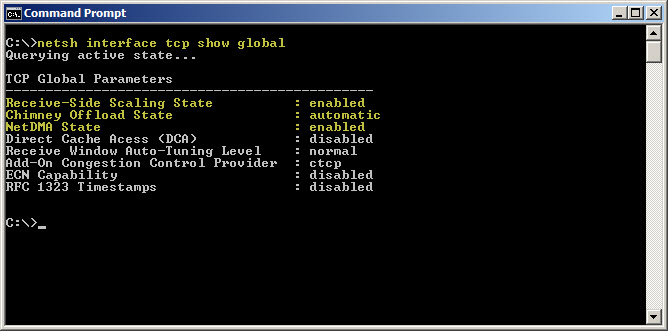
As you can see, SNP components such as receive-side scaling, chimney offload, and NetDMA are enabled by default. Thankfully TMG is now fully compatible with all of the scalable networking features. There is no need to disable them unless you have a specific requirement to do so.
Connect


 Richard Hicks' Forefront TMG Blog